Stranger Things Skinpack! 15 New Skins
- 22-02-2026, 03:37
- 717
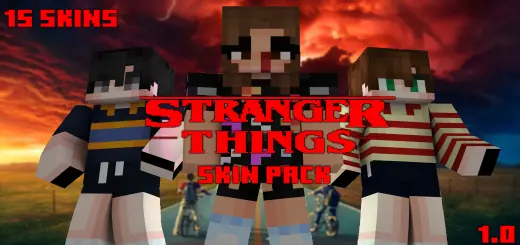
Stranger Things Skinpack! 15 New Skins is a character-focused pack for fans who want to bring the Stranger Things vibe into their Minecraft Bedrock sessions without needing a full horror addon or story map. The pitch is simple: if you want to “visit the Upside Down� with your friends, you can do it by showing up as the characters instead of just building the setting. It’s meant to be easy to download and usable across Bedrock platforms, including PC, mobile, and Xbox, so it’s set up for regular multiplayer sessions where everyone can match the theme.
The pack includes 15 skins pulled from the Stranger Things roster, mixing heroes, villains, and a couple of alternate versions. The list is: Mike, Eleven, Dustin, Will, Lucas, Max, Hopper, Demogorgon, Robin, Vecna, Eleven (S3), Chrissy, Vecna (3D), 011, and Billy. That variety is nice because it means you can run a full friend-group lineup and still have room for the “monster player� or the “main villain� role when you’re doing roleplay, minigames, or a horror-themed survival night.
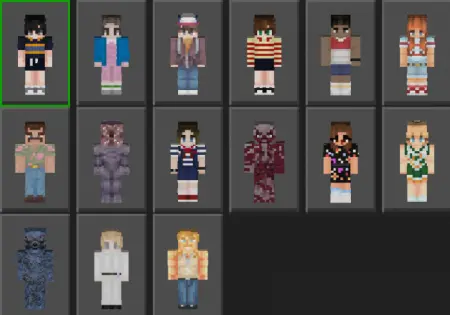
What makes a skin pack like this fun on Minecraft Bedrock is that it instantly changes the vibe of whatever you’re doing. You don’t need special mechanics for it to feel like a Stranger Things session—just having the crew in the right skins turns normal gameplay into themed gameplay. You can run a Hawkins-style town build, explore caves like you’re sneaking through the Upside Down, or do PvP rounds where Demogorgon or Vecna becomes the “boss� your friends try to survive against. Even simple stuff like taking screenshots, making thumbnails, or recording short clips feels more legit when everyone is actually dressed as the characters.
Practical tip: if you’re playing with friends, assign skins before you start so the group looks intentional instead of random. Pick one person to be Demogorgon or Vecna for that instant horror energy, then let the rest be the main cast. Stranger Things Skinpack! 15 New Skins is basically the quickest way to turn a normal Bedrock world into a Stranger Things-themed hangout without changing your mechanics—just your look and the story you act out.
How to Install Skins in Minecraft Bedrock
- Download a .png skin (64×64 or 128×128).
- Open Minecraft Bedrock.
- Go to Profile (hanger icon) → Edit Character.
- Tap Owned → Import → Choose New Skin.
- Select your .png file.
- Pick a model: Classic (Steve) or Slim (Alex).
- Confirm to equip and play.
Comments (0)