SRG's Voxel Skin Pack
- 9-06-2026, 02:52
- 1 157
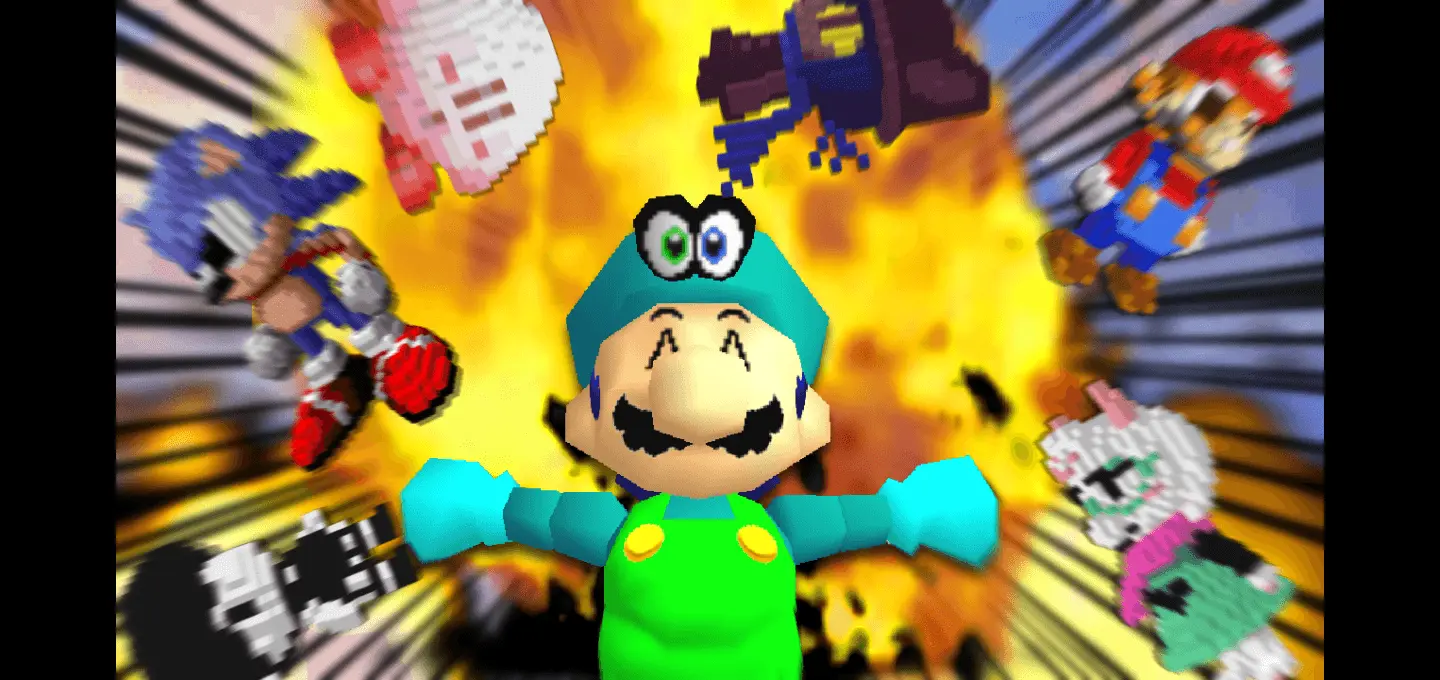
SRG's Voxel Skin Pack is all about one thing: voxel style. The creator makes it clear the skins are made only with voxel (3D pixel art), which means the look is meant to feel more sculpted and dimensional than a flat, painted-on skin vibe. If you like skins that look like they were built out of tiny cubes—almost like miniature figures—this pack is aimed straight at you.
In Minecraft Bedrock, voxel-styled skins are fun because they stand out in motion. When you’re running, jumping, fighting, or just standing in a lobby, the extra “3D pixel art� feel can make your character look more like a little toy or a collectible figure rather than just a flat texture on a player model. That makes them great for screenshots, thumbnails, and server hangouts where everyone wants a distinct look that pops from a distance.


Ditch those flat, painted-on textures and give your character genuine physical volume with the SRG’s Voxel Skin Pack, a mind-bending cosmetic drop that reimagines classic player avatars through layered, miniature 3D voxel geometry.
Let’s be real for a minute: standard 64x64 skin templates have hit a creative ceiling. No matter how insane the pixel artist is with their shading tricks, at the end of the day you’re still rocking a smooth, flat cardboard box with two arms and two legs. That’s why custom geometry models have been blowing up across the Bedrock ecosystem. This pack completely bypasses the traditional flat-plane aesthetic by building out intricate, block-by-block extrusions on the player mesh. Instead of a drawn-on helmet or a shaded collar, your character features actual micro-blocks protruding from the model, creating real physical depth that casts micro-shadows under directional sunlight.
Roaming through survival worlds with this voxel makeover changes your whole perspective in third person. When you sprint through a dense spruce forest or drop into an underground cavern lit by glowing lichen, the voxel layers catch dynamic lighting in ways standard skins physically cannot. You get actual depth on backpacks, utility pouches, protruding shoulder pads, and mechanical goggles. It looks like an artisan took a microscopic chisel to a piece of solid stone and carved out an entirely new player skeleton. Even simple actions like pulling back a bowstring or raising a shield look vastly more cinematic because the protruding geometry flexes naturally without looking stretched or warped.
This kind of skin pack also works well for mini-games because the bold voxel silhouette tends to be easier to track in fast gameplay. If you’re doing PvP, parkour, hide-and-seek, or just racing friends, a voxel skin can make it easier for people to recognize you quickly. And if you’re building themed worlds, voxel characters can fit right in, especially in maps that already use a “toy box,� “pixel statue,� or “mini figure� vibe.
Practical tip: if you’re playing with friends, choose voxel skins with clearly different shapes and color palettes so you can identify everyone instantly during chaotic fights or mini-games. SRG's Voxel Skin Pack is basically for players who want that crisp, 3D pixel art aesthetic—still blocky, still Minecraft-feeling, but with extra depth and presence.
Quick guide: How to install this Minecraft skinpack
Downloaded the .mcpack file? Here is exactly how to get it into your game depending on what device you are using right now.
- On Windows or Android: Just click or tap the downloaded file twice. Minecraft will open up on its own and load the skins immediately.
- On iPhone or iPad: Save the file, open your Files app, and hold your finger on it. Hit Share, select Minecraft from the list, and the game will handle the rest.
To put the skins on, just open Minecraft, head over to the Dressing Room (Profile), click on Classic Skins on the left, find this pack under Owned, and tap Equip.
Comments (0)