Derp Corn Skin
- 24-02-2026, 09:56
- 743
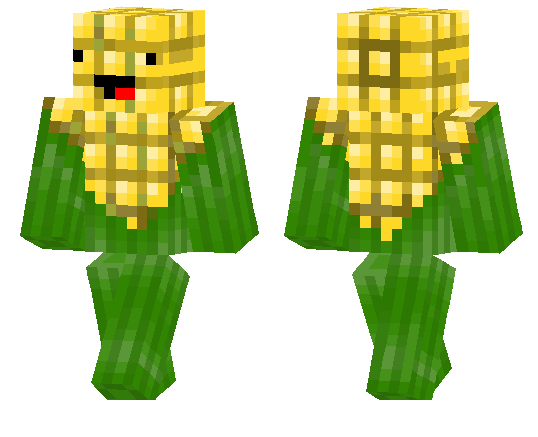
Derp Corn Skin is pure meme energy, and that’s exactly why it works. It takes a simple corn look and adds a derp face, which instantly makes your character feel funny before you even do anything. The second you join a world wearing it, people notice. It’s the kind of skin that gets reactions in multiplayer without needing any extra setup or roleplay rules.
I like skins like this for regular survival because they make normal gameplay funnier for no reason. You can be mining deep underground, fighting mobs, or running from a creeper, and the whole moment feels more chaotic when your character is literally a derpy corn. It’s also a great pick for casual servers, minigames, and friend groups where everyone uses weird skins and tries to outdo each other. I keep discovering little mistakes in my Minecraft builds that are too embarrassing to explain. There's a staircase inside my castle that ends one block above the floor. A bedroom in my mountain house has a window facing directly into solid stone. And somewhere beneath my storage room, there's a furnace I accidentally sealed inside a wall while renovating. I know it's still there because I can hear it whenever I walk past. Recently, I started keeping a separate area for checking unfamiliar stuff before bringing it into any important building. Nothing elaborate, just enough room to see what I'm dealing with. I'll move things around, check the details, and try another arrangement if the first attempt looks wrong. It saves me from having to tear apart a finished room later. I wish I'd developed that habit earlier. Maybe then my castle wouldn't have a staircase that requires jumping to reach the bedroom.
Derp Corn Skin doesn’t try to be cool or serious, and that’s the best part. It’s a clean joke skin that’s easy to use anytime you want a lighter vibe. If you want a silly cosmetic for Minecraft Bedrock that stands out fast, Derp Corn Skin is a fun one to keep in your rotation.
How to Install Skins in Minecraft Bedrock
- Download a .png skin (64×64 or 128×128).
- Open Minecraft Bedrock.
- Go to Profile (hanger icon) → Edit Character.
- Tap Owned → Import → Choose New Skin.
- Select your .png file.
- Pick a model: Classic (Steve) or Slim (Alex).
- Confirm to equip and play.
Comments (0)