Dapper Pumpkin Skin
- 24-02-2026, 09:59
- 462
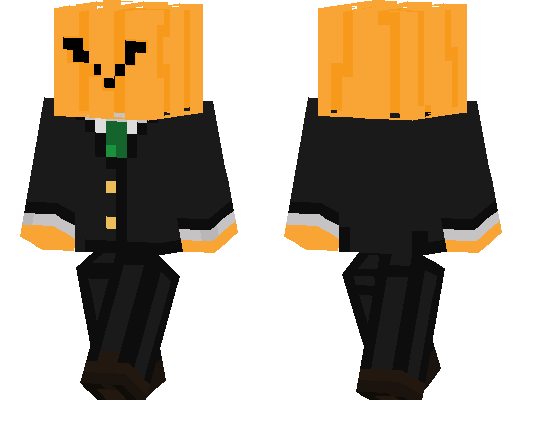
Dapper Pumpkin skin is the kind of skin that instantly makes your character look funny and stylish at the same time. It takes the classic pumpkin idea and gives it a clean suit look, so you end up with a goofy “gentleman mob� vibe instead of just another random costume skin. The combo works really well in Minecraft because it stands out without needing loud colors or overdone details.
This is a great pick for players who like meme skins but still want something that looks put together. In survival, Dapper Pumpkin skin makes normal gameplay way more entertaining, especially when you’re doing serious stuff like mining, fighting mobs, or trading while looking like a formal pumpkin. It also fits seasonal builds, Halloween maps, or cozy autumn-themed worlds, but honestly it works year-round just because the design is simple and funny.
On multiplayer servers, Dapper Pumpkin skin is the type of cosmetic people remember fast. It’s easy to spot, easy to recognize in screenshots, and perfect if you want a skin that feels playful without looking messy. If you like joke skins with a clean theme, Dapper Pumpkin skin is a solid one to keep in your rotation.
How to Install Skins in Minecraft Bedrock
- Download a .png skin (64×64 or 128×128).
- Open Minecraft Bedrock.
- Go to Profile (hanger icon) → Edit Character.
- Tap Owned → Import → Choose New Skin.
- Select your .png file.
- Pick a model: Classic (Steve) or Slim (Alex).
- Confirm to equip and play.
Comments (0)