Green Girl Skin
- 6-03-2026, 16:20
- 663
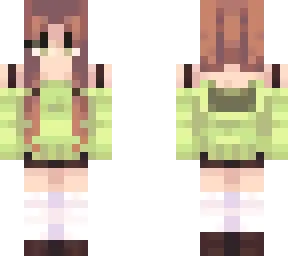
Green Girl - download the skin of a beautiful girl with long hair and a green sweater. Green is the detail that draws your attention, but the skin doesn’t need an elaborate costume or a long backstory to be appealing. It looks like someone ready to settle into a new world, find a place to build and see where the next path leads. If green is already your favorite color, it’s an easy choice to make your character feel a little more personal.
The sweater gives the character a comfortable appearance that suits all sorts of settings. You might wear the skin while building a cottage in the woods, tending a garden near your base or walking through a village with friends. It also works just as well when your plans are less peaceful: the same character can head underground with a pickaxe or set out to explore an unfamiliar landscape. There’s no particular role you have to play. You can choose Green Girl simply because you like how she looks and keep the skin for whatever you happen to be doing that day.
Long hair is another part of the design that gives the character her own look. You can switch to a third-person view to see the outfit while you move around, or take a few screenshots in a place you like. A green meadow, a forest path or the garden outside your house would make a natural setting, although the skin can stand out just as nicely against snow or stone. If you play with friends, it’s an outfit that’s easy to recognize when you meet up for a building project or head out together. You could even choose green details for your base or banner if you enjoy matching your character’s appearance with the things you build.
To use Green Girl, import the skin image through the dressing room in Minecraft and choose the character model that displays it correctly. Once it’s equipped, you can use it in your own world or when playing with others. A skin changes your character’s appearance, so your tools, armor and usual activities will still be there when you return to the game. If you put on armor, remember that it can cover parts of the outfit; you can always take it off when you want a clear look at the sweater and hair. Green Girl is a pleasant choice for a long survival world, a creative building session or a relaxed visit to a friend’s map. Pick a place you enjoy, settle in and make the character part of your own adventure.
How to Install Skins in Minecraft Bedrock
- Download a .png skin (64×64 or 128×128).
- Open Minecraft Bedrock.
- Go to Profile (hanger icon) → Edit Character.
- Tap Owned → Import → Choose New Skin.
- Select your .png file.
- Pick a model: Classic (Steve) or Slim (Alex).
- Confirm to equip and play.
Comments (0)