Pocket Gui+ Resource Pack
- 29-09-2025, 12:48
- 1 192
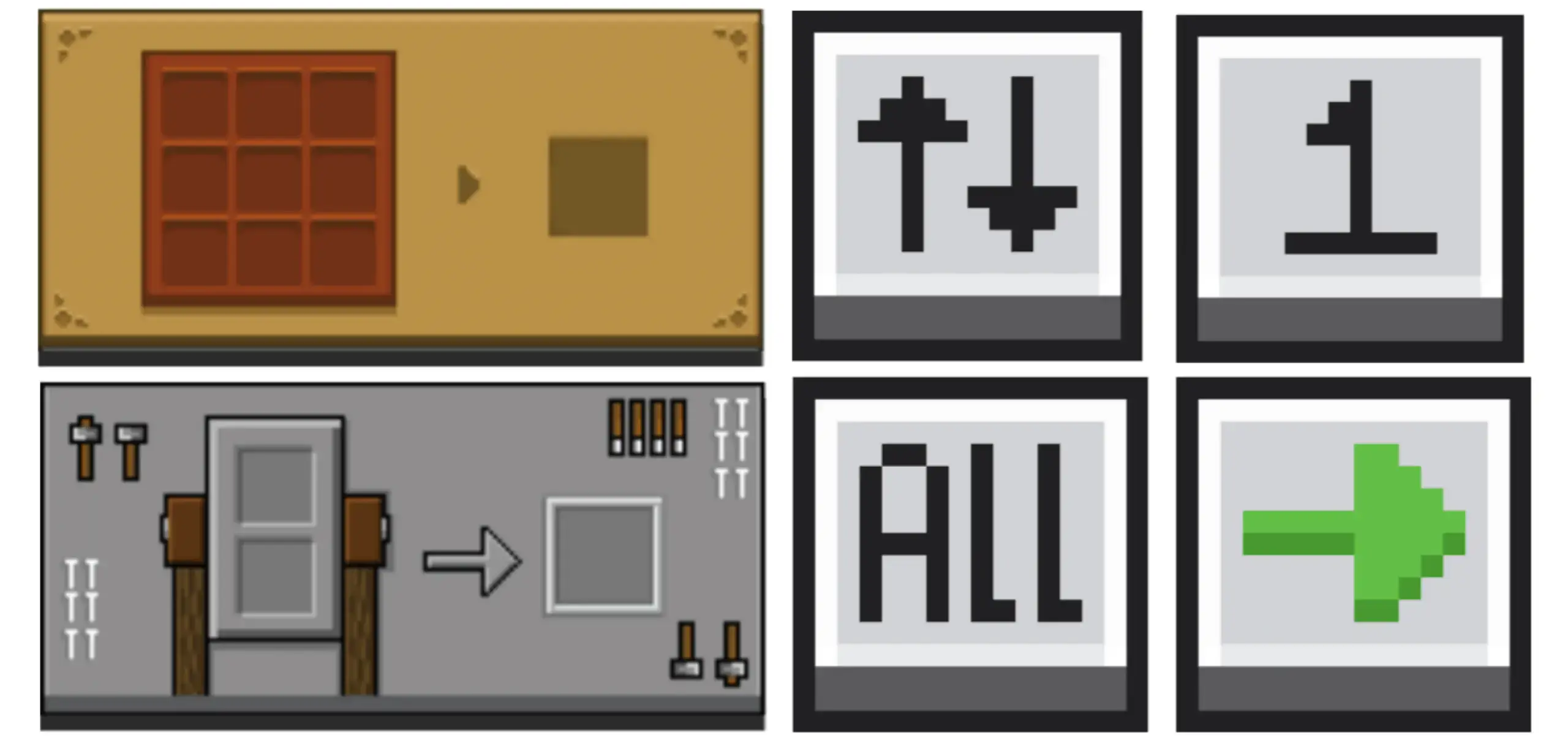
Pocket Gui+ — a clean UI makeover for Minecraft Bedrock that finally makes your menus feel like part of the world. Open a crafting table and the interface looks like the table you’re touching. Pop a furnace and the screen carries the same vibe as the block in front of you. It’s subtle, but it changes the rhythm of play; you stop feeling like you’re diving into a generic overlay and start feeling grounded in the station you’re actually using.
You open a crafting table, and the menu actually looks like it belongs to the block in front of you. Pocket GUI+ gives Minecraft Bedrock’s workstations their own visual style and adds handy controls for moving items around.
The pack changes the interfaces of usable blocks while keeping the familiar Minecraft look. A crafting table gets a menu themed around its design, and opening a furnace brings up a screen with a look of its own. Anvils and other workstations receive similar attention, giving your workshop a little more personality each time you use it. It’s a detail you’ll notice during the ordinary stuff: making a new pickaxe, smelting the iron from your latest cave trip, or repairing a favorite piece of equipment before heading out again. The menus still serve the jobs you expect them to, so you can get back to crafting without learning an entirely new system. If you’ve spent hours arranging a workshop so every block has its place, it’s nice to see that character carry through when you actually open each station. Try walking through your base and checking the blocks you use most; seeing their interfaces side by side gives you a good feel for the pack’s approach.
Pocket GUI+ also includes features aimed at those moments when inventory management starts eating into playtime. Quick Loot helps when you’re collecting items from a chest, whether you’ve found supplies underground or you’re moving materials around your base. There are controls for dropping one item or dropping all items as well, which can be useful when your inventory is full of things you no longer need. Picture returning from a long mining trip with a few valuable finds and a lot of extra blocks. You can open your storage, deal with the useful haul, and clear out unwanted items before heading back down. Take a second to check what you’re dropping, though—getting rid of that spare dirt feels great until you realize your favorite tool was selected. The pack also includes guides, giving you another resource to check while getting familiar with its interface.
The result is a resource pack that fits comfortably into a regular survival session. You’ll see it while preparing food, organizing supplies, and moving between the stations in your base, so it has plenty of chances to make those small interactions more pleasant. It can be useful during a group build too: grab materials from storage, craft what you need, and get back to placing blocks while your friends work on the roof. To try it, import the pack into Minecraft and activate it in your resource pack settings. Then open a crafting table, furnace, and anvil to compare their new screens, and give the inventory controls a try with items you don’t mind moving. Pocket GUI+ is a nice pick if you enjoy Minecraft’s classic style and want your menus to feel more connected to the blocks you use every day. Your storage room may still be a mess, but at least sorting it can look better.


I ran it in a fresh survival and the flow improved immediately. Crafting felt snappier because my brain wasn’t context-switching between block and menu art, and moving items around didn’t turn into a mini–inventory war. The Quick Loot option is clutch when you’re flipping chests during a build session or clearing a dungeon haul; you can sweep what you need without dragging stacks back and forth. The Drop One Item and Drop All Items actions are perfect for cleanup runs, whether you’re ditching junk before a raid or sorting a farm output line that got a little too spicy. The pack keeps the classic Minecraft style, so nothing looks out of place—just sharper, more consistent, and way more readable.
Setup is the usual Bedrock routine: enable the resource pack and jump in. Because Pocket Gui+ is a standalone take on the creator’s NeBux UI, you get the themed GUIs and the quality-of-life touches without extra fluff, and it plays nicely on both Bedrock/MCPE. Day-to-day, that means an anvil feels like an anvil when you’re renaming gear, a furnace UI feels like hot iron when you’re smelting, and your storage runs don’t stall out in the menus. If you want Minecraft Bedrock to keep its vanilla soul while giving every workstation its own identity—and speeding up the little inventory moments—Pocket Gui+ is the pack I’d keep on.
Installation:
- Download Texture;
- Open the downloaded .mcpack to install;
- Select texture in settings;
- Done.
Comments (0)