Custom Atmospherics – Shader
- 6-03-2026, 17:02
- 732
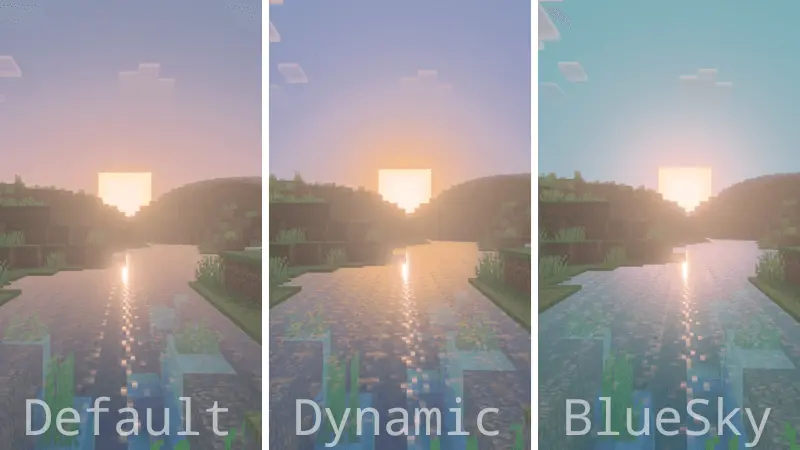
Custom Atmospherics – Shader with several settings options to get beautiful and unique graphics. See screenshots for examples of different options for Custom Atmospherics shaders. The sky can change how an entire Minecraft landscape feels. A house you pass every day might look completely different beneath a bright afternoon sky than it does near sunset, with the horizon filling the space behind it. Custom Atmospherics is a visual pack centered on that atmosphere, offering settings that let you change the look of the sky and choose a style you enjoy. It’s something you can appreciate during an ordinary survival session as well as when you’re searching for a place to take a screenshot. You don’t need to build a new world around it: a familiar coastline, a path home, or the view from a favorite hill can give you a good place to see what the pack changes.


The available settings give you room to compare different looks. A clearer sky can suit a bright daytime build, while a more colorful atmosphere may be just what you want when you’re watching the sun go down over the water. Try viewing the same location at several times of day before settling on a preference. A wide desert gives you an open horizon, whereas a forest frames the sky between the trees. Both can be interesting places to check the atmosphere, and the difference may help you decide which setting feels right for your world. If you like taking pictures of your builds, try stepping back far enough to include both the structure and the sky behind it. The background can change the mood of a screenshot even when the building itself stays exactly the same.
Custom Atmospherics can be enjoyable during exploration too. Long journeys often take you through several landscapes in one session, giving you plenty of chances to see how your chosen sky looks above mountains, water, forests, and open plains. You might find yourself stopping for a moment at the end of the day instead of heading straight back to your base. The pack is also a pleasant addition for players who enjoy building places around a view. A balcony, a hilltop shelter, or a dock facing the horizon can become a favorite spot simply because of what you see from it. If you share a world with friends, those locations can make good places to gather or take a group picture after finishing a project.
To install the pack, open the downloaded file to import it into Minecraft, then select it in your resource pack settings. After entering a world, explore the available visual options and choose the atmosphere you prefer. Appearance can depend on your device and graphics settings, so it’s useful to test the pack in the world where you plan to use it. Take a walk around during the day, return to a familiar viewpoint at sunset, and see which look you want to keep. Custom Atmospherics is a simple way to give the scenery above your builds more attention, whether you’re preparing a screenshot or just enjoying the view on the way home.
Installation:
- Download Shader;
- Open the downloaded .mcpack to install;
- Select texture in settings;
- Done.
Comments (0)