Nami Visual Shader
- 24-05-2026, 02:59
- 615
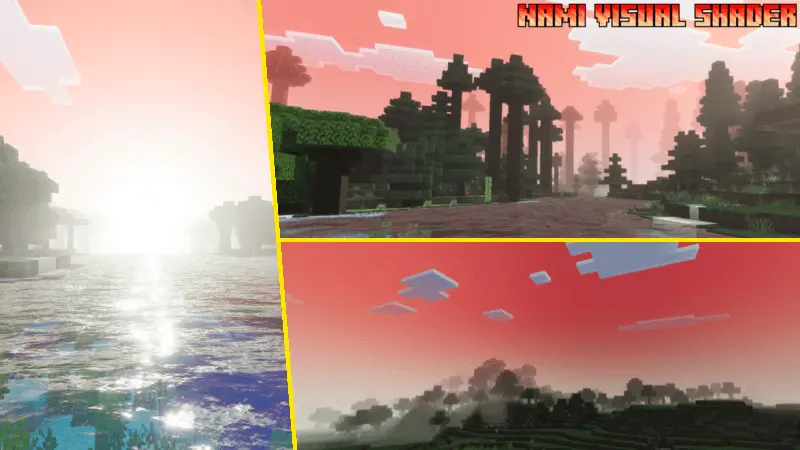
Nami Visual Shader is built around a very specific visual vibe: warmth, saturation, and an ambient color style that leans red. The description points out dynamic midtones and highlights, which is the part that usually makes a shader feel “alive� during real play, because lighting changes aren’t just flat brightness shifts. Instead, the world’s brighter spots and in-between tones get more presence, which can make landscapes, builds, and interiors feel richer while you move.


A big technical piece mentioned is ACES tone mapping, used to make the visuals more appealing. In gameplay terms, that usually means the color response feels smoother and more controlled instead of harsh, with lighting that looks more balanced when you go from shade to sunlight or from indoors to outdoors. Nami Visual Shader also applies color temperature adjustments to create its unique ambient style, and the description specifically calls it out as a good match for fans of red shaders. That means the pack is intentionally giving your world a warmer, red-tinted mood instead of trying to look neutral.
In actual Minecraft Bedrock sessions, a shader like this is great when you want the world to feel more dramatic and stylized without needing a giant feature list. Warm, saturated color grading can make sunset travel, torch-lit bases, and desert or mesa builds feel extra intense, and it can also make everyday survival routines feel less plain because the world has a consistent mood layer on top. If you like building cozy interiors, working around campfires, or doing night exploration where warm light sources are always on screen, the red-leaning ambient style can make those moments look especially strong.
A practical way to enjoy Nami Visual Shader is to test it in a few different environments—open daylight, shade, interiors, and nighttime—so you can feel how the midtones and highlights shift with the warmer color temperature. If you want a bold, warm, saturated look with ACES tone mapping and a distinct red shader vibe, Nami Visual Shader is a solid Minecraft Bedrock visual style pick.
Installation:
- Download Shader;
- Open the downloaded .mcpack to install;
- Select texture in settings;
- Done.
Comments (0)