Survival Art Deco House #12 Map
- 13-03-2026, 02:26
- 403
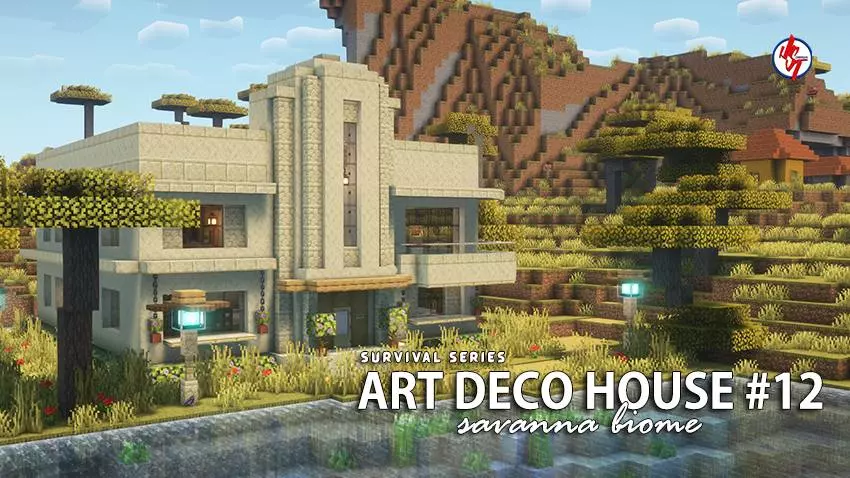
Survival Art Deco House #12 - Minecraft map with a very beautiful house that supports survival. This house as an art space, looks very cool. A finished house can change the way a new Minecraft world begins. Instead of spending the first evening searching for a safe place and putting up temporary walls, you can step outside, look around, and decide what you want to do first. Survival Art Deco House gives you that kind of start in a savanna setting. The house has a completed exterior and interior, with useful items waiting inside, so it’s ready to become your base. Its art deco theme also gives it a distinct look compared with the simple shelters many players build when they’re eager to get started. You appear inside the house, which means you can take your time exploring the rooms before heading out into the surrounding landscape.


The setting is part of the appeal. Savannas have an open feel that makes it easy to look across the terrain and think about where you might build next. There’s an existing village near the house, giving you somewhere to visit when you want a break from working on your own base. You might make a path between the two, trade with villagers as you play, or simply use the settlement as a landmark when returning from a trip. Having neighbors nearby also makes the world feel a little less empty from the start. The house itself is already complete, but that doesn’t mean you have to leave it untouched. Look through the interior, decide which areas you want to keep as they are, and make room for the resources you collect. A familiar home becomes more personal once you’ve spent a few days bringing back materials and deciding where everything belongs.
The art deco theme makes this an interesting map for builders as well as survival players. Walk around the outside before you change anything and see how the house sits in the savanna. Then go inside and look at the way the finished rooms make the building usable. You may find an idea you want to adapt later, whether that means planning a more distinctive entrance for your next home or paying closer attention to how an interior fits the shape of a building. If you enjoy larger projects, the surrounding area gives you a place to continue building around the house. A garden, a separate workshop, or a road toward the village could be a good first addition.
You can play alone, invite friends to share the house, or treat the build as inspiration for a future project. Achievements are listed as enabled for the map, giving you another goal to pursue as you develop the world. To begin, import the downloaded world into Minecraft and open it from your worlds list. Take a look through the house, visit the village when you’re ready, and decide what you want to add to your new corner of the savanna.
How to install?
Android: you need to find the downloaded file on your phone, use any file manager for this and import the map into the game by opening it.
IOS: after receiving the map, the device itself will offer to install it.
Windows 10: go to the folder where the files are downloaded, find mcworld there and activate it.
Comments (0)