Void BaG "transfer trash to xp" Mod / Addon
- 11-02-2026, 05:50
- 667
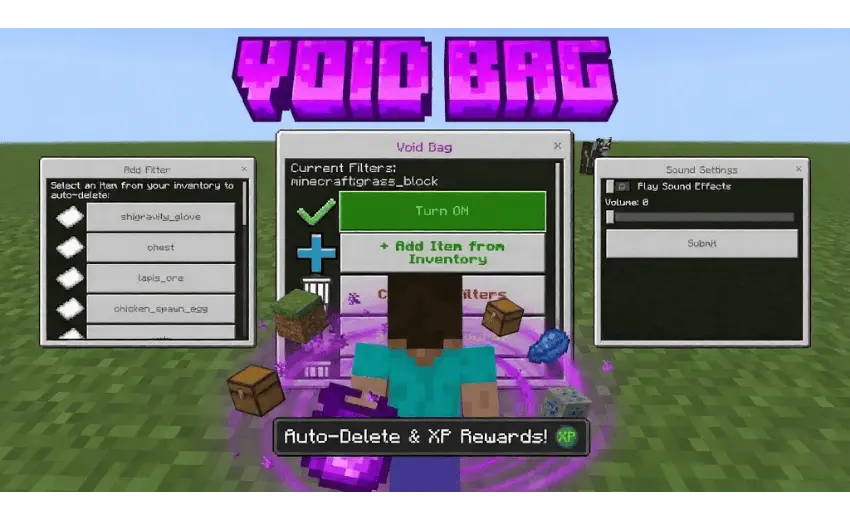
Void BaG "transfer trash to xp" Mod is a straight quality-of-life add-on for anyone who’s tired of their inventory exploding after every mining trip. The main feature is a Void Bag item that can automatically destroy unwanted items from your inventory, which means less time doing the annoying “open chest, dump junk, repeat� routine and more time actually playing.
In real survival sessions, clutter is what slows you down the most. You go into a cave for iron, and you come out with a pile of random stuff you never planned for. Then you either waste time sorting it, or you throw it on the ground and make your base look like a landfill. Void BaG "transfer trash to xp" Mod keeps things cleaner by handling the “trash� problem for you, especially during long grinds where you’re picking up the same useless drops over and over. The biggest win is momentum: you can stay out longer, keep mining, keep exploring, and not get forced into a base trip just because your pockets are full.


The description also calls out that it’s meant to stay balanced for survival and not mess with server performance. That matters a lot if you’re on a shared world, because nobody wants a convenience tool that turns into lag city. Practically, you’d use the Void Bag as your personal cleanup filter: keep it ready during mining runs, huge building projects, or anything that floods you with leftovers. It’s also nice for travel sessions where you’re looting and you only want the good stuff—food, tools, and valuables—without wasting slots on filler.
To keep it feeling fair, don’t treat it like a “delete everything� button. Use it to remove the obvious junk so you still have to make real choices about what you carry home. Void BaG "transfer trash to xp" Mod fits perfectly into Minecraft Bedrock survival when you want less inventory drama and more actual progress without turning your world into a messy item pile.
Installation Mod:
- Download the .mcaddon / .mcpack;
- Open the file to import into the game;
- In World Settings → Resource Packs and Behavior Packs, enable it (turn on Experiments if needed);
- Have fun!
Comments (0)