Video Roleplay Bots Addon
- 4-08-2026, 05:39
- 304
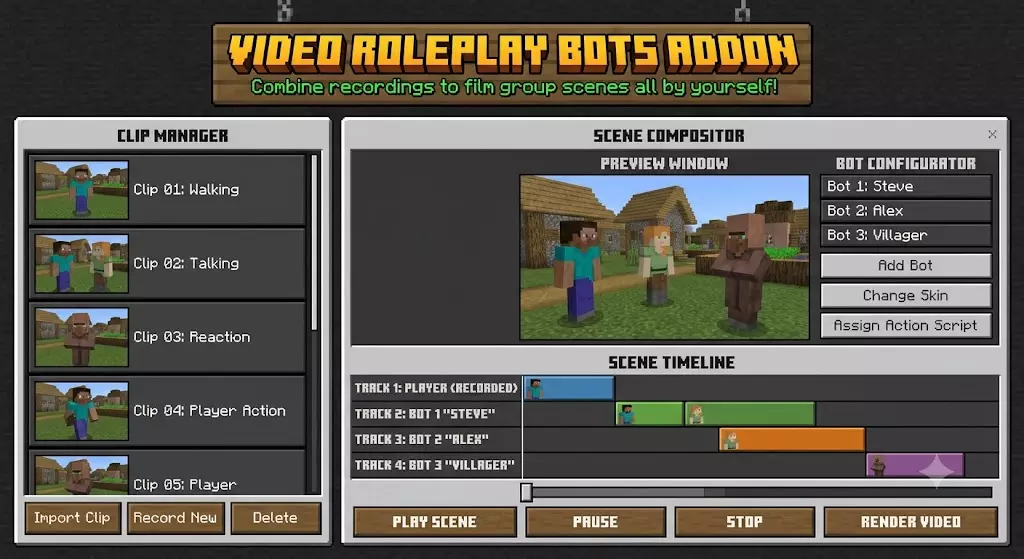
The Video Roleplay Bots Addon gives solo content creators an instant camera crew by letting you record your own character movements and replay them as interactive NPCs. It completely removes the pain of hunting for extra players just to film a quick cinematic or roleplay scene in Bedrock.
If you make shorts, cinematic trailers, or storytelling videos on MCPE, you know how hard it is to coordinate friends to stand in specific spots or act out script beats. This Minecraft Bedrock roleplay mod fixes that by acting like a fully customizable action recorder. Just type /record in chat, act out whatever movement or combat sequence you need, and save it. You can stitch multiple recordings together into complex Scenes, creating fully choreographed fights, crowded town squares, or multi-character conversations—all by yourself.
The built-in editing features make this MCPE bot recorder addon surprisingly powerful. If your timing was off or you walked into the frame too early, you can quickly snip the edges of a clip without re-doing the whole take. Crucial commands like /menu, /stoprec, and /stopscene give you complete control over playback right from your chat box. Just remember to enable Beta APIs in your world experiments before loading in, or the scripts won't execute. Grab this pack, open the main menu, and start directing your own cinematic blockbusters without waiting on a crew.
What makes this MCPE bot recorder addon seriously overpowered is how much control you actually get over the final product. You are not just locking one basic NPC into a stiff looping animation. The pack lets you stitch multiple different recordings together into massive dynamic Scenes. Need a bustling marketplace with ten different characters doing their own thing at the exact same time? You can build that giant crowd by yourself. And if you totally botch the timing on your entrance or bump into a wall, you do not even have to record the take all over again. The integrated editing features allow you to snip the edges of your clip right from the chat menu using quick commands like /menu, /stoprec, and /stopscene.
Before you jump in and start shooting your next viral blockbuster, make sure you flip on the Beta APIs in the experiment settings menu of your world. The custom scripts driving these interactive AI actors will not fire up without it. Whether you are running your world on Xbox, mobile, or Windows 10, the setup is incredibly straightforward. Just import the mcpack file, activate both the behavior and resource packs, and hit the green light.
Stop waiting on your friends to log in just to get that perfect cinematic shot. Grab the Video Roleplay Bots Addon, build your custom sets, and start churning out premium Minecraft movies on your own schedule. Your YouTube channel and your sanity are going to thank you.
Installation Mod:
- Download the .mcaddon / .mcpack;
- Open the file to import into the game;
- In World Settings → Resource Packs and Behavior Packs, enable it (turn on Experiments if needed);
- Have fun!
Comments (0)