DYNAMIC SHADER
- 12-02-2026, 13:07
- 1 226
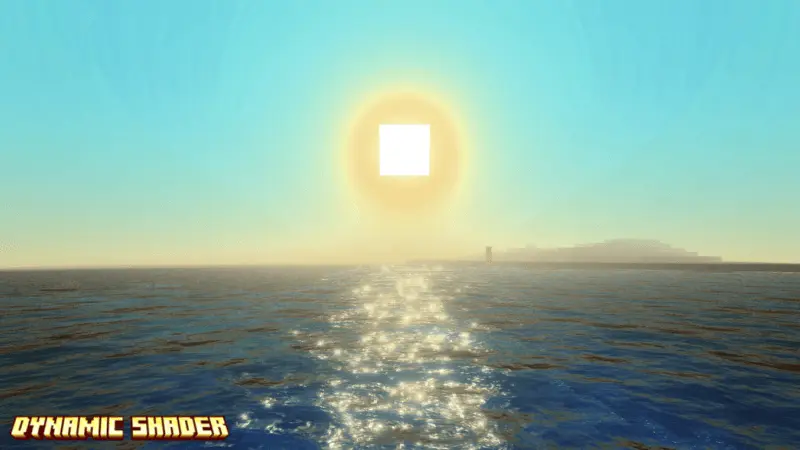
DYNAMIC SHADER is made for players who want their world to look less “flat� and more like a fantasy RPG, with the description directly comparing the vibe to games like Genshin Impact. The goal isn’t to change gameplay mechanics—it’s to change how everything feels when you’re walking around, building, and just existing in your world. If you’re the type who stops and stares at scenery when the lighting hits right, this shader is basically built for you.
The shader specifically calls out an ocean-blue sky atmosphere, which is the kind of color shift that can make even familiar biomes feel new. It also adds deep blue water that’s meant to look realistic, pushing that “real-life� look instead of the usual simple water feel. That’s huge if you build near coasts, rivers, or lakes, because water ends up being a constant part of your view. When water looks better, your entire base area instantly looks more polished without you placing a single extra block.


Realistic shadow effects are another big focus. Shadows are what make builds feel “3D� and dramatic, especially around sunrise and sunset when the light changes fast. With DYNAMIC SHADER, those times of day are meant to feel like an event—long shadows, warmer lighting shifts, and a world that looks more alive just from how light hits the environment. It’s perfect for screenshots, cinematic walks through your base, or slow exploration runs where you’re not trying to speedrun anything.
The description also mentions enjoying sunrise and sunset views with your partner or your dog, which fits the cozy side of the shader. In Minecraft Bedrock, shaders are at their best when you build for them—set up a balcony, a dock, or a rooftop view spot so you can actually take in the lighting changes instead of missing them while you’re mining underground. Practical tip: water and shadows can make darker areas feel even darker, so keep your main paths and base entrances well-lit if you want the world to stay readable. DYNAMIC SHADER is for players who want a calmer, more cinematic RPG look with blue skies, deep water, and lighting that makes the world feel more alive.
Installation:
- Download Texture;
- Open the downloaded .mcpack to install;
- Select texture in settings;
- Done.
Comments (0)