Santa Baddies: Christmas Special Skin Pack
- 12-01-2026, 09:40
- 474
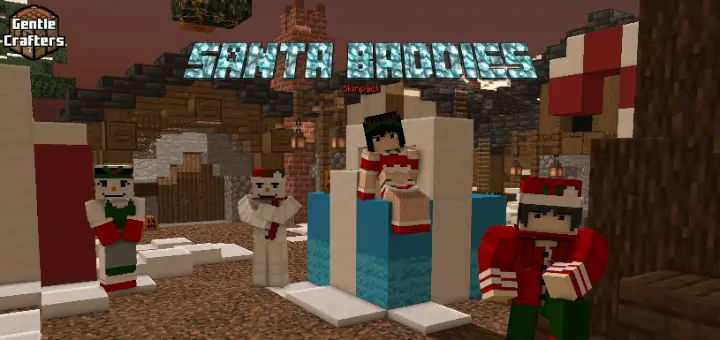
Santa Baddies: Christmas Special Skin Pack is basically a holiday mood switch for your character, built around festive energy, cozy vibes, and winter cheer. If you’re the kind of player who likes matching the season with your look, this pack is an easy way to make every session feel like a Christmas hangout.
The best time to throw on Santa Baddies: Christmas Special Skin Pack is when you’re doing anything social—party worlds, group builds, or just messing around with friends. Holiday skins hit different when you’re standing around a tree build, chilling in a snowy spawn area, or doing a little “gift exchange� roleplay with a chest full of random loot. Even if you’re not doing full-on roleplay, the vibe still lands because everyone instantly gets the theme.


For survival nights, the fun part is how the cozy look contrasts with the usual stress. You’ll be out there running from mobs in the dark, diving into caves for resources, then popping back to base looking like you’re headed to a winter party. If you’re building, lean into the season—decorate your base like a holiday cabin, set up warm lighting, and keep a “winter market� area where you and your friends can trade items. The skins don’t change gameplay, but they make those normal routines feel more like an event.
If you’re recording clips or taking screenshots, Santa Baddies: Christmas Special Skin Pack works best when you pick locations that match the winter cheer—snowy biomes, cozy interiors, or bright holiday builds. It’s also a solid move for Minecraft Bedrock group sessions, because themed skins make it easier to set the tone fast without explaining anything. Santa Baddies: Christmas Special Skin Pack is all about celebrating Christmas in style and keeping the holidays feeling active every time you load in.
How to Install Skins in Minecraft Bedrock
- Download a .png skin (64×64 or 128×128).
- Open Minecraft Bedrock.
- Go to Profile (hanger icon) → Edit Character.
- Tap Owned → Import → Choose New Skin.
- Select your .png file.
- Pick a model: Classic (Steve) or Slim (Alex).
- Confirm to equip and play.
Comments (0)