Red Spirit Skin
- 15-01-2026, 15:41
- 778
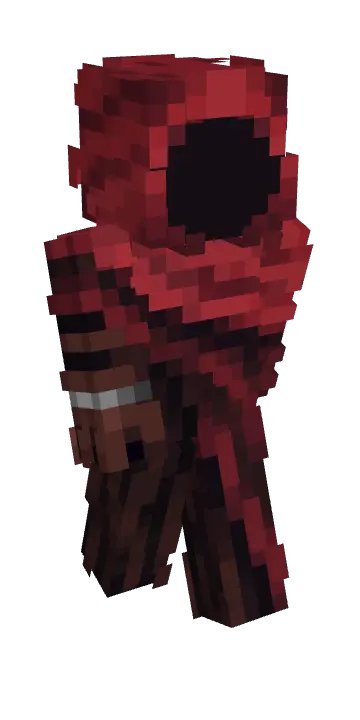
Red Spirit Skin is all about showing up with that eerie presence without needing a whole costume pack. The name alone sets the tone, and it’s perfect when you want your character to feel like a wandering legend in your world—something that looks right at home in dark forests, abandoned ruins, or a torch-lit base at midnight.
In survival, this skin fits the mood when you’re exploring caves, pushing through storms, or doing late-night supply runs where everything feels a little more intense. It also works great for building sessions if you’re making creepy towns, graveyard-style areas, or anything horror-themed, because your character actually matches the atmosphere instead of looking random in screenshots.
Someone spots a red figure outside the base after dark. It’s only you, but your friends don’t have to know that right away.
Red Spirit Skin gives your Minecraft Bedrock character a mysterious look suited to players who enjoy a little drama with their survival. The spirit theme leaves plenty of room to decide who your character is: a wandering stranger, a guardian of an abandoned place, or just the person on the server who takes spooky screenshots way too seriously. You don’t need to commit to a backstory to enjoy it, either. Sometimes a skin is simply a good match for the world you’re playing in. Red Spirit feels at home around dark forests, old ruins, and the kind of mountain base that looks even better after sunset. Bring it along on a mining trip, and your character can look like part of the underground scenery while everyone else is busy arguing over which tunnel leads home. It’s a visual change, but choosing a look with this much atmosphere can make those familiar adventures feel a little different.
If your friends enjoy roleplay, there are plenty of ways to put the skin to work. Build a small shrine deep in the woods and make your character its silent keeper. Set up a mysterious meeting place on a multiplayer server, then invite the others to discover it. Or take a less serious route and become the red spirit of the community storage room, appearing whenever somebody leaves their loot unsorted. A horror map is another good place to wear it, especially when the group is already watching every doorway. For screenshots, experiment with places that give the character some space in the frame: a path leading toward a distant building, a torch-lit entrance, or a clearing at night. You can make a scene feel tense without staging a huge battle. Put a friend on the other side of the shot and suddenly there’s a story in the image: are they meeting an ally, or have they just wandered somewhere they shouldn’t?
Red Spirit is a player skin, so it changes your appearance without changing how Minecraft works. You can still wear armor, use your usual tools, and play through survival as normal; there are no built-in ghost powers or special attacks to figure out. To equip it, download the file and extract the PNG image from the ZIP. Open the dressing room in Minecraft Bedrock, find your owned skins, and choose the import option. Select the image, pick the arm model that displays it correctly, and take a quick look at your character in third person. After that, bring Red Spirit into whichever world fits your mood. It can be your regular look while you build and explore, or something you save for an event with friends. Just remember that the scariest entrance loses a little impact when you immediately ask everyone if they have any spare iron.
On multiplayer or roleplay worlds, Red Spirit Skin makes it easy to lean into a character persona—guardian, ghost, villain, whatever your crew is running with. It’s a cosmetic swap, so your gameplay stays the same, but your vibe changes instantly, and Red Spirit Skin gives you that “don’t mess with me” energy the whole session.
How to Install Skins in Minecraft Bedrock
- Download a .png skin (64×64 or 128×128).
- Open Minecraft Bedrock.
- Go to Profile (hanger icon) → Edit Character.
- Tap Owned → Import → Choose New Skin.
- Select your .png file.
- Pick a model: Classic (Steve) or Slim (Alex).
- Confirm to equip and play.
Comments (0)