In black Skin
- 15-01-2026, 15:44
- 865
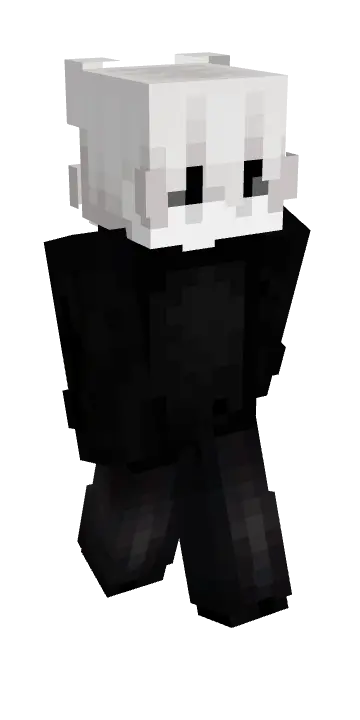
In black Skin is for players who like keeping their character style quiet and sharp. The whole point is the dark, minimal vibe—something that looks good anywhere without screaming for attention, whether you’re mining, building, or just running around spawn.
In a survival world, this kind of look matches pretty much everything. It fits caves, night runs, Nether trips, and those long sessions where you’re organizing storage and expanding your base. On servers, In black Skin also works as a “main” skin you can stick with for months, because it doesn’t clash with whatever theme your friends are building, and it still looks clean in screenshots and clips.
Some Minecraft skins make an entrance before you even say a word. In Black takes the quieter route, giving your character a dark, understated look that feels right at home almost anywhere.
The appeal is in keeping things simple. In Black doesn’t need a flashy costume or a long character backstory to work; its dark style is enough to give your avatar a distinct presence. It’s the sort of skin you can settle on for a long survival world without feeling like you need to change outfits every time your plans do. One day you’re digging out a basement, the next you’re crossing the ocean in search of a new place to build. Your character still looks ready for either job, even if your inventory is full of random blocks and you’ve forgotten why you brought three boats.
A darker look fits the mood of a nighttime expedition especially well. Picture heading out from your base with a pickaxe, a stack of torches, and just enough food for a quick cave trip that somehow lasts an hour. In Black suits those quiet stretches of Minecraft, when you’re listening for mobs and trying to remember which tunnel leads back to the surface. It also feels at home around a modern build, a stone fortress, or a simple starter house. You don’t have to design your whole world around it. Pick the places you like and let the skin become part of your usual adventures.
On a multiplayer server, In Black works nicely as an everyday character skin. It’s easy to imagine wearing it while helping a friend build, joining a minigame, or hanging around spawn waiting for everyone to get organized. If roleplay is more your thing, the understated style leaves plenty of room to make up your own character. You could be the quiet explorer who knows the best routes through the mountains, the builder who always volunteers for late-night projects, or just the friend who keeps finding everyone’s lost gear. There’s no fixed personality attached to the outfit, so it can fit whatever kind of story your group is playing.
In Black is a cosmetic choice, so it won’t make you invisible in the dark or give you an advantage in a fight. You’ll still need to watch your health, bring decent gear, and hope that creeper doesn’t drop in behind you. To use the skin, import its image through the Minecraft Bedrock character editor, then choose the character model that displays it correctly. After that, jump into a world and see how it looks alongside your favorite armor and builds. If you prefer a straightforward style that doesn’t demand attention every second, this is an easy one to wear for a quick server session or a much longer survival run. It’s also a solid choice for screenshots when you want the scenery and your latest build to share the spotlight.
If you play PvP, a dark skin can feel more focused just because it’s visually simple and easy to read while you’re moving fast. In black Skin keeps the style straightforward so your gameplay stays the star, not some loud outfit.
How to Install Skins in Minecraft Bedrock
- Download a .png skin (64×64 or 128×128).
- Open Minecraft Bedrock.
- Go to Profile (hanger icon) → Edit Character.
- Tap Owned → Import → Choose New Skin.
- Select your .png file.
- Pick a model: Classic (Steve) or Slim (Alex).
- Confirm to equip and play.
Comments (0)