White Gunner Skin Pack
- 20-10-2026, 12:14
- 1 105
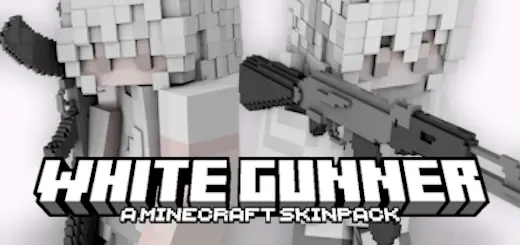
White Gunner Skin Pack is less about flashy colors and more about presence. The description paints a clean image: a figure in white moving through the darkest night, with enough mystery that it sounds like there’s a whole tale behind the name. In Minecraft Bedrock, that kind of skin works best when you lean into contrast—white against deep shadows, bright snow against dark skies, quiet moments that feel cinematic even when you’re just doing normal survival stuff.
In everyday gameplay, this pack is perfect for night runs and stealthy roleplay energy. If you’re traveling after sunset, building far from spawn, or slipping through forests and caves, the “white in the dark” look makes you stand out in a way that feels intentional, like you’re a character with a reputation. It also hits different in snowy biomes or high mountain areas, where the white aesthetic can blend with the environment and make you look like a ghost cutting across the landscape.


Looking closely at the pixel geometry reveals why this wardrobe carries so much visual punch in third-person view. Rather than slapping flat white rectangles across the limbs, every piece uses razor-sharp micro-shading to define chest rig pouches, heavy-duty knee guards, and tactical sling mounts across the torso. Holstered secondary clips, radio harnesses, and reinforced combat boots feel physically grounded to the model instead of looking painted on. If you run custom texture packs or hop into worlds with dynamic lighting enabled, the reflective values off the white plating catch the ambient glow of lanterns and muzzle flashes without blowing out your screen into a blinding smudge.
PvP warriors grinding competitive arena games like Bedwars, SkyWars, or hardcore SMP factions will instantly feel the psychological edge here. Rocking pure white tactical armor is an unapologetic power flex—it tells everyone across the bridge that you aren't trying to hide in the dirt or crouch in dark corners; you're confident enough in your aim, strafing, and sprint-resets to fight right in the open. At the same time, if your realm runs winter biomes, snowy mountain bases, or deep powdered-snow terrain, that white plate acts as brutal natural camouflage. Slipping behind a drift on a snowy taiga ridge while picking off enemies with a crossbow turns you into an absolute ghost before the enemy squad even registers where the fire is coming from.


For PvP and multiplayer vibes, White Gunner Skin Pack can be used two totally opposite ways depending on how you play. If you want intimidation, white is bold because it’s visible and confident—like you’re not scared of being seen. If you want mind games, you can use darkness and terrain to break line-of-sight, then reappear in the open as this bright silhouette, which makes people hesitate for a second longer than they should. Practical tip: build your base lighting with strong shadows and clean bright spots so your screenshots and in-world moments match the “darkest night” theme the pack is selling.
The biggest win with White Gunner Skin Pack is how easy it is to turn normal sessions into a mood. Mining trips feel like missions. Long roads feel like patrol routes. Even just walking back to your base can feel like you’re “returning to the hideout” after something went down. If you like skins that suggest a story without spelling everything out, White Gunner Skin Pack is a solid way to make your character feel like a legend people notice.
How to Install Skins in Minecraft Bedrock
- Download a .png skin (64×64 or 128×128).
- Open Minecraft Bedrock.
- Go to Profile (hanger icon) → Edit Character.
- Tap Owned → Import → Choose New Skin.
- Select your .png file.
- Pick a model: Classic (Steve) or Slim (Alex).
- Confirm to equip and play.
Comments (0)