Corrupt Steve - Skindex
- 24-02-2026, 10:10
- 521
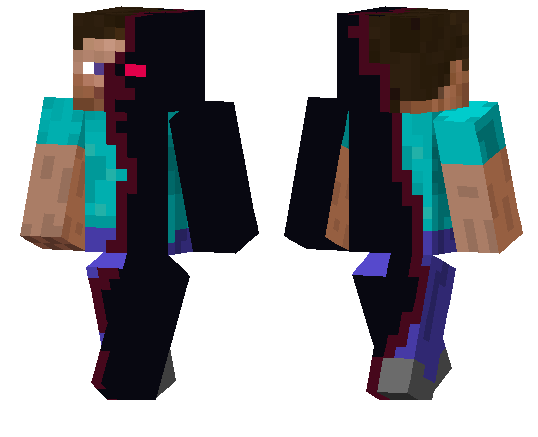
Corrupt Steve - Skindex is a great pick if you want a skin that feels familiar at first glance but looks wrong the longer you stare at it. The “half Steve, half what?� idea is what makes it fun—it keeps that classic Steve identity, then messes it up with a corrupted side that gives your character a glitchy, infected, or cursed look depending on the world you’re playing in.
This kind of skin works really well in survival because it adds a story vibe without changing any gameplay. You can use it in a normal world and make night exploration feel more tense, or wear it on a horror map where your character already looks like part of the problem. It also fits roleplay worlds if you want to play as a “changed� survivor, a failed experiment, or some mystery character nobody trusts.
Corrupt Steve - Skindex is also a strong multiplayer skin because people instantly recognize the Steve part, then notice the corrupted design and ask what it is. If you like creepy skins that still feel tied to classic Minecraft style, Corrupt Steve - Skindex is an easy one to keep in your rotation.
How to Install Skins in Minecraft Bedrock
- Download a .png skin (64×64 or 128×128).
- Open Minecraft Bedrock.
- Go to Profile (hanger icon) → Edit Character.
- Tap Owned → Import → Choose New Skin.
- Select your .png file.
- Pick a model: Classic (Steve) or Slim (Alex).
- Confirm to equip and play.
Comments (0)