Demon Masks Skin Pack
- 26-02-2026, 14:02
- 556
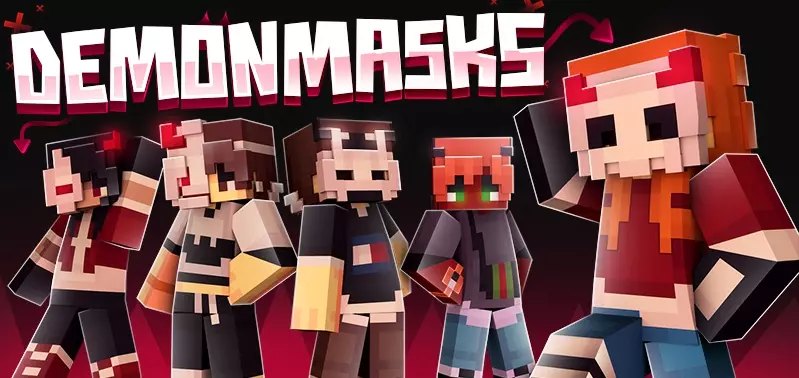
Demon Masks Skin Pack is a small but focused skin collection built around a clear theme: demon-style characters with creepy masks and glowing horns. With 7 demon skins included, it’s meant to give you a set of options that all match the same vibe, so you can switch looks without leaving the theme. If you like skins that feel edgy and a little unsettling, this pack is designed for exactly that mood.
In actual Minecraft Bedrock play, a demon-mask look works really well in a few different situations. In survival, it adds a darker personality to your character during night runs, cave dives, and base defense moments, especially when you’re walking around torch-lit tunnels or exploring spooky builds. In PvP or minigames, a set of intimidating demon skins can also be a fun psychological flex, because the glowing horns and mask style gives you that “boss fight� presence even before the match starts. On servers, it’s also an easy way to stand out in a crowd without using bright neon colors or goofy costumes.

The best thing about a themed set like Demon Masks Skin Pack is that it’s simple to use but still gives you variety. You can pick a skin that matches your world’s mood, your build theme, or even your role in a friend group, while keeping the same overall demon-mask identity. A practical way to get the most out of it is to rotate skins depending on what you’re doing: use one look for chill survival building, another for nighttime hunting sessions, and a more aggressive one for PvP nights or tournament practice.
Demon Masks Skin Pack is a solid choice for players who want a creepy, dark-themed character style in Minecraft Bedrock without needing a huge skin bundle. With 7 demon skins built around glowing horns and creepy masks, it’s a clean cosmetic pack for anyone who wants their character to look spooky and memorable in everyday play.
How to Install Skins in Minecraft Bedrock
- Download a .png skin (64×64 or 128×128).
- Open Minecraft Bedrock.
- Go to Profile (hanger icon) → Edit Character.
- Tap Owned → Import → Choose New Skin.
- Select your .png file.
- Pick a model: Classic (Steve) or Slim (Alex).
- Confirm to equip and play.
Comments (0)