Red + Black Skin Pack
- 2-11-2026, 10:03
- 1 163
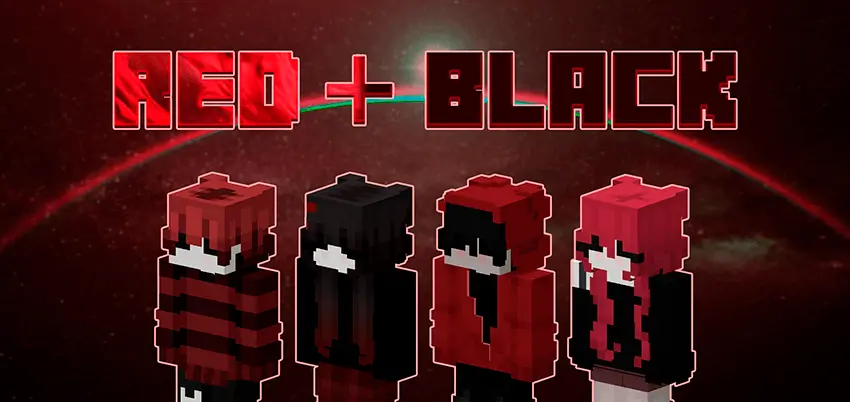
Red + Black - a new skin pack of 6 cool guys and girls. These skins are in red and black colors. Red and black is a color combo that looks ready for trouble, whether you’re joining a PvP match or just showing up late to your friends’ survival server. Red + Black gives your Minecraft character six outfits built around those colors, with looks for both boys and girls.
The pack sticks to a shared palette while offering several characters to choose from. That makes it handy if you like a consistent style but don’t want to wear the exact same skin forever. Pick one look for your main survival world, switch to another when you jump into a minigame, or try the crimson-colored option when you want a change within the theme. Red accents stand out against black, so the outfits have a striking appearance without needing every color in the palette. Open the character screen and look through all six before settling on a favorite; the one that catches your eye in the lineup might feel different once you see it on your character.

Playing with friends? The collection gives your group a way to coordinate without everyone wearing an identical skin. Choose different characters from the pack and head into a team game with a shared red-and-black look. It could work for a Bed Wars squad, a group screenshot outside your survival base, or a roleplay world where you want your crew to look like they belong together. You can also make one of the skins part of a character you’ve already imagined. Maybe they run a shop in the server’s busiest district, guard a fortress, or keep disappearing into the Nether with an inventory full of supplies. The pack doesn’t assign a story to the outfits, leaving you free to decide who your character is and what they do. For solo play, try matching your chosen skin with a banner or a build that uses the same colors; even a small room decorated around that palette can feel more personal.
Installing the pack is straightforward: open the downloaded file with Minecraft, let it import, and visit the Dressing Room to choose a skin. Once you’ve picked one, check it from the front and back and see how it looks while your character moves. You can return to the selection whenever you feel like wearing a different outfit from the collection. A new skin won’t change your tools, armor stats, or chances in a fight, but it does change the character you see and share with other players. Red + Black is a good fit if you want a bold look that works across different worlds, from a casual building session to a chaotic night of minigames. Choose the character that feels right, join your next game, and make that red-and-black style your own.
How to Install Skins in Minecraft Bedrock
- Download a .png skin (64×64 or 128×128).
- Open Minecraft Bedrock.
- Go to Profile (hanger icon) → Edit Character.
- Tap Owned → Import → Choose New Skin.
- Select your .png file.
- Pick a model: Classic (Steve) or Slim (Alex).
- Confirm to equip and play.
Comments (0)