Cyberpunk Girl Skin
- 19-03-2026, 04:40
- 513
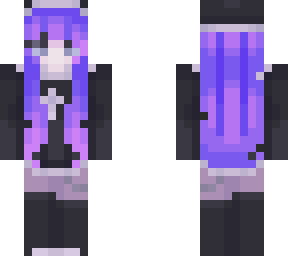
Cyberpunk Girl Skin will add a girl with beautiful purple hair. Cyberpunk Girl gives your Minecraft character a futuristic identity with one detail that immediately catches the eye: purple hair. It’s a skin that feels at home in a city full of tall buildings and glowing signs, but you can wear it anywhere your adventures take you. Maybe your character lives in an apartment above a crowded street, works in a hidden laboratory, or has left the city behind to explore the wilderness. You get to decide. The skin is a visual choice, so it fits into the world you already enjoy playing. Put it on for a building session with friends, take it along on an adventure map, or make it your everyday look while you gather resources and work on your base.
A futuristic city is a natural place to start if you enjoy building around a character. Your Cyberpunk Girl could live there while you gradually expand the neighborhood around her. Add a train station for traveling across the city, a workshop for storing materials, or a rooftop garden that offers a little quiet above the streets. Purple glass and lighting can echo the color of her hair, though your city doesn’t have to follow a single color scheme. If you’re building with friends, everyone can design a home or business for their own character. Then, when the streets are finished, take a walk together and see how the different builds fit into the same neighborhood.
The skin is also useful for creating a character in a multiplayer story. You might play a courier delivering supplies between districts, a mechanic looking after a workshop, or an explorer who keeps finding abandoned places beyond the city limits. Give her a name, choose a place she considers home, and let the rest of the story develop as you play. She could meet friends for a building project, head underground in search of materials, or end up defending the neighborhood when monsters appear after dark. You can also take pictures as your city grows, from the first small building to the finished skyline.
To equip Cyberpunk Girl, download the archive from the linked page and extract the PNG image inside. Open Minecraft, go to your profile, and choose to edit your character. From the owned skins section, select the import option, find the extracted image, and choose the character model that fits it. Once you’ve confirmed the skin, enter a world and switch to a third-person view to see your character from different angles. Try walking around your favorite build or take a screenshot with friends to see how the look fits your setting. Keep the PNG somewhere easy to find if you like changing skins for different worlds. Whether you’re planning a futuristic roleplay or simply want a new appearance for survival, Cyberpunk Girl is ready to join your next Minecraft session.
How to Install Skins in Minecraft Bedrock
- Download a .png skin (64×64 or 128×128).
- Open Minecraft Bedrock.
- Go to Profile (hanger icon) → Edit Character.
- Tap Owned → Import → Choose New Skin.
- Select your .png file.
- Pick a model: Classic (Steve) or Slim (Alex).
- Confirm to equip and play.
Comments (0)