The Ruins Assassins Skinpack
- 24-03-2026, 11:37
- 874
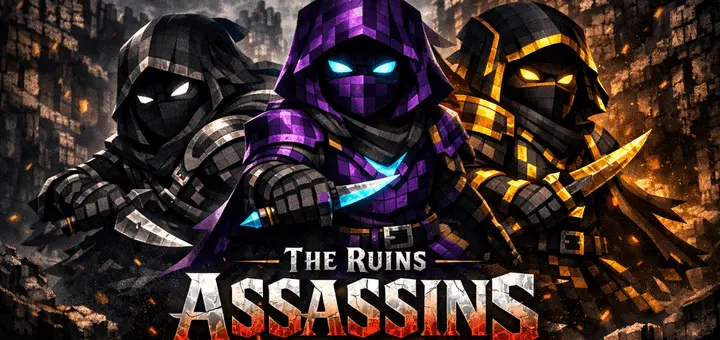
The Ruins Assassins Skinpack very beautiful, detailed HD skins Assassins are collected here in one pack for Minecraft PE. His pale eyes stand out against his shadowy appearance, making him a fitting choice if you like the idea of a character who travels quietly and keeps his intentions to himself. Imagine arriving at a village after dark, finding a room for the night, and leaving again before anyone knows where you came from. Or give him an entirely different story: he could be a scout for a group of friends, a guardian of a hidden base, or simply the character you choose for an ordinary survival world.
Void Assassin has a more mysterious fantasy feel, with violet tones that connect him to the hidden depths beneath the ruins. His story suggests a character drawn to places where something strange and powerful has been left behind. That makes him a natural fit for exploring the End, building a base in a remote location, or playing through an adventure map with a darker atmosphere. You could make an underground home for him, with a long passage leading to a private room, or choose a tower where he can watch the surrounding landscape. The pack gives you the appearance; what the character does with it is up to you.


Royal Assassin brings gold into the darker design and is connected to the remains of the old kingdom. He might suit a player who wants a character with a link to a fallen royal family or an ancient order of guards. A ruined castle is an obvious place to begin, but you don’t have to stay among broken walls. You could rebuild the fortress, make a new home inside it, and decide that your character is protecting what remains of the kingdom. Add a courtyard, a watchtower, and a path to a nearby village, and you have a setting for plenty of your own stories.
The collection is especially easy to use with friends. Three players can choose the featured assassins and explore the same world as a group, each taking on a different role. One might scout ahead while another gathers supplies for the journey. You could build a shared headquarters beneath a hill, create a ruined temple together, or visit an adventure map and see where the story takes you. If you prefer playing alone, the skins work just as well for giving your usual character a darker fantasy look.
These are character skins, so their weapons and abilities are up to you to provide through normal gameplay. Wearing an assassin design won’t make you invisible or give you extra damage, but you can choose equipment that fits the character you have in mind. A sword and shield might suit a guardian of the ruins, while a bow gives a wandering scout another way to handle a fight. As your survival world grows, your character can grow with it, collecting better gear and finding a place to call home.
Import the skin pack, open the character selection, and try the available looks in your world. Turn your character around to see the details, then pick the assassin that fits the adventure you want to play. Whether you’re exploring a forgotten stronghold or building one of your own, there’s room to make the story behind the skin yours.
How to Install Skins in Minecraft Bedrock
- Download a .png skin (64×64 or 128×128).
- Open Minecraft Bedrock.
- Go to Profile (hanger icon) → Edit Character.
- Tap Owned → Import → Choose New Skin.
- Select your .png file.
- Pick a model: Classic (Steve) or Slim (Alex).
- Confirm to equip and play.
Comments (2)