Orb Army Skin Pack
- 30-04-2026, 12:43
- 357
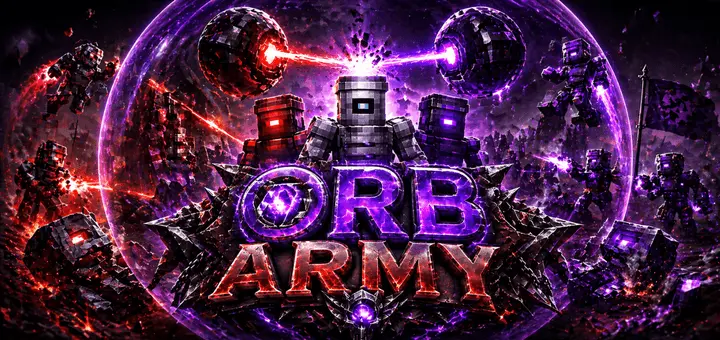
Orb Army - futuristic and fantastic Orb Army skins for Minecraft Bedrock. Orb Army gives your Minecraft character the look of a futuristic robot warrior. The pack contains three skins with armor-inspired designs and bright details resembling energy cores. They’re a good fit if you enjoy science fiction and want a character who looks ready to patrol a space station, defend a high-tech base, or join a team of robots. You can also wear one while doing the usual Minecraft jobs—there’s something funny about a battle-ready robot spending the afternoon harvesting potatoes.
The three designs share the same futuristic theme, but each gives you a choice for your character’s appearance. Take a look through the pack and pick the one you like best. The energy-core details are a distinctive part of the style, giving the outfits the impression that there’s some kind of power behind the armor. They’re visual details rather than working equipment, but they help make the characters look different from an ordinary player skin. If you like creating stories for your worlds, it’s easy to imagine where a robot like this came from and what it’s doing in Minecraft.
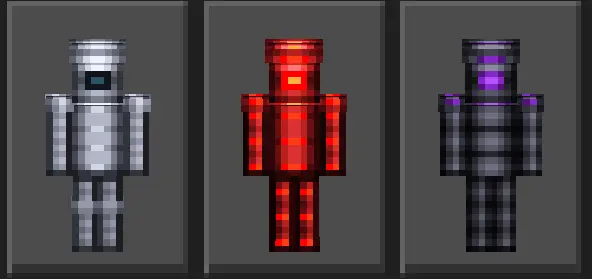
Orb Army is especially convenient for a group of three friends. Each player can choose a different skin, and you’ll have a matching team without all looking identical. You could build a shared headquarters, divide up rooms, and head out together to explore the surrounding world. One player might enjoy mining, another could work on the base, and the third might be the one who keeps bringing home animals. Your group doesn’t have to take the robot theme seriously, either. Just seeing three armored characters gathered around a crafting table is enough to give a normal survival session a different feel.
If you want to build something that matches the skins, try making a futuristic base with a control room, storage area, and an entrance that looks like an airlock. Iron blocks, glass, and lights can help set the scene, though you can start with whatever materials you have available. A small room built into a mountain works just as well as a huge space station. Once the basic shelter is finished, add details when you have time: a map wall, a place for equipment, or a viewing window over the landscape. The skins can give you an idea for the project, while the rest is yours to design.
The characters would also suit an action map or a PvP session where you want a coordinated look. Choose your skin before a match, meet your teammates in the lobby, and take a screenshot together before things get chaotic. In a solo world, you could use one as the appearance of an explorer searching for a place to establish a base. The pack doesn’t add missions or enemies, so you’re free to use the characters with whatever maps and activities you already enjoy.
The armor and energy cores are part of the skin designs. They don’t give your character extra protection, light up the surrounding area, or add special attacks. You’ll still need to craft and wear actual armor before taking on dangerous mobs. Orb Army is a visual pack, and its appeal is the chance to play as a robot-style character. Pick one of the three looks, bring it into your world, and decide what kind of adventure your new character is going to have.
How to Install Skins in Minecraft Bedrock
- Download a .png skin (64×64 or 128×128).
- Open Minecraft Bedrock.
- Go to Profile (hanger icon) → Edit Character.
- Tap Owned → Import → Choose New Skin.
- Select your .png file.
- Pick a model: Classic (Steve) or Slim (Alex).
- Confirm to equip and play.
Comments (0)