Doflamingo Skin
- 17-08-2026, 01:20
- 261

Turn heads on your favorite server with the Doflamingo skin, bringing the ultimate anime villain aesthetic straight to your Bedrock world. If you want to flex a massive pink feathered coat and pure chaotic energy, this is the exact look you need.
Most players try to look intimidating with dark, edgy outfits, but showing up to a raid wearing bright pink and sunglasses is honestly just a massive power move. You get to channel one of the most iconic antagonists from One Piece while completely dominating your PvP matches. The loud colors make it impossible to miss you, which is perfect if you are trying to pull aggro or just want everyone in the lobby to know exactly who is wiping their squad.
Translating that crazy fluffy jacket into blocky textures could have easily looked like a neon mess, but the pixel work here is actually insanely clean. The shading on the feathers gives the coat real depth, and the blonde hair with the signature shades sits perfectly on the character model. It completely avoids that flat, washed-out look that ruins so many community-made downloads.
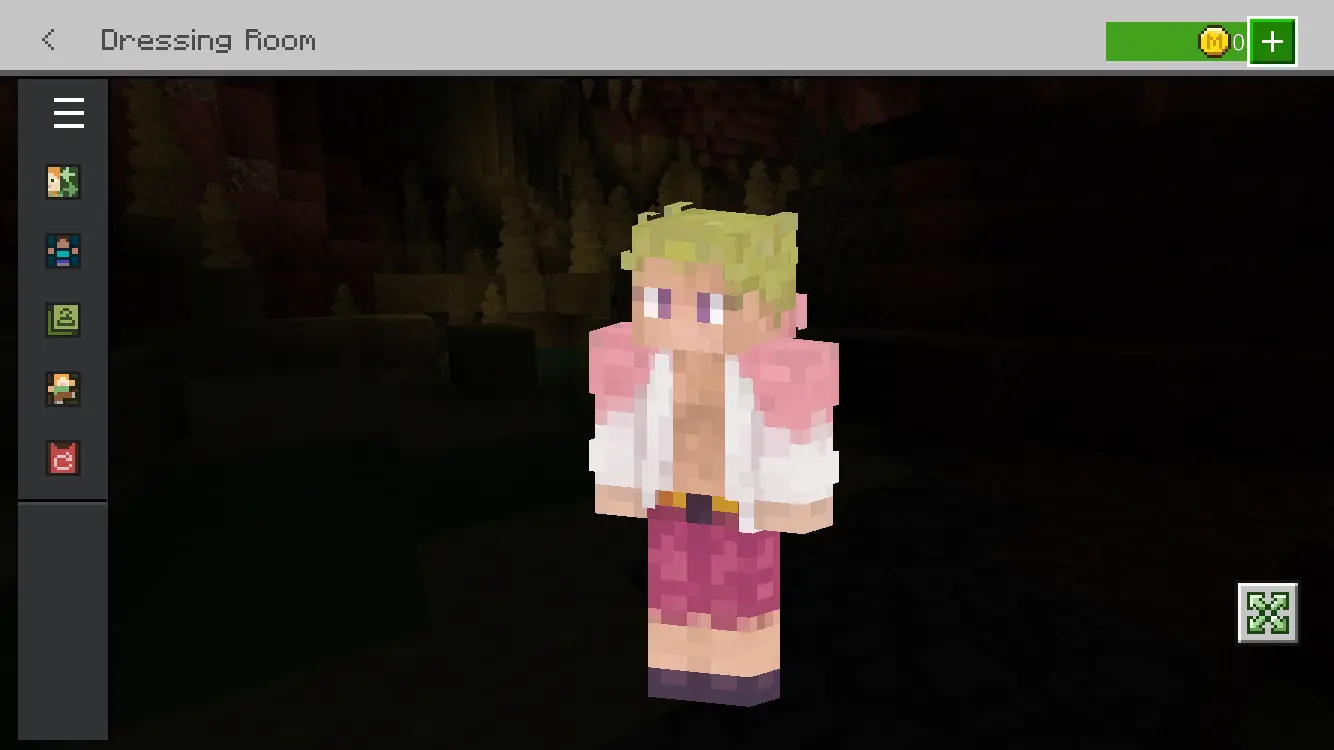
Searching for a top-tier Minecraft anime skin usually means scrolling through endless pages of broken files and weirdly shaded knock-offs. This specific MCPE custom skin skips the hassle and delivers a flawless design right out of the gate. Update your locker with this premium Minecraft Bedrock skin today and bring some serious warlord drip to your next gaming session.
Quick guide: How to install this Minecraft skinpack
Downloaded the .mcpack file? Here is exactly how to get it into your game depending on what device you are using right now.
- On Windows or Android: Just click or tap the downloaded file twice. Minecraft will open up on its own and load the skins immediately.
- On iPhone or iPad: Save the file, open your Files app, and hold your finger on it. Hit Share, select Minecraft from the list, and the game will handle the rest.
To put the skins on, just open Minecraft, head over to the Dressing Room (Profile), click on Classic Skins on the left, find this pack under Owned, and tap Equip.
Comments (0)