Best Meme Skin +67 Funny Skin Pack
- Yesterday, 02:51
- 87

The Best Meme 67 Skin Pack throws the absolute funniest internet legends straight into your Minecraft wardrobe. If you want to log in and instantly make your whole squad lose their minds laughing, this massive collection is exactly what you need.
Taking survival mode seriously all the time gets exhausting. Sometimes you just need to spawn in as GigaChad and punch trees, or aggressively crouch-spam your friends while wearing a beautifully cursed Trollface fit. This bundle actually delivers 67 completely unhinged options. We are talking classic legends like Doge and Pepe, plus sweaty modern favorites like Wojak. You can practically run an entire comedy show in your realm just by swapping avatars every five minutes. The sheer variety here guarantees you will never run out of ways to troll your server.
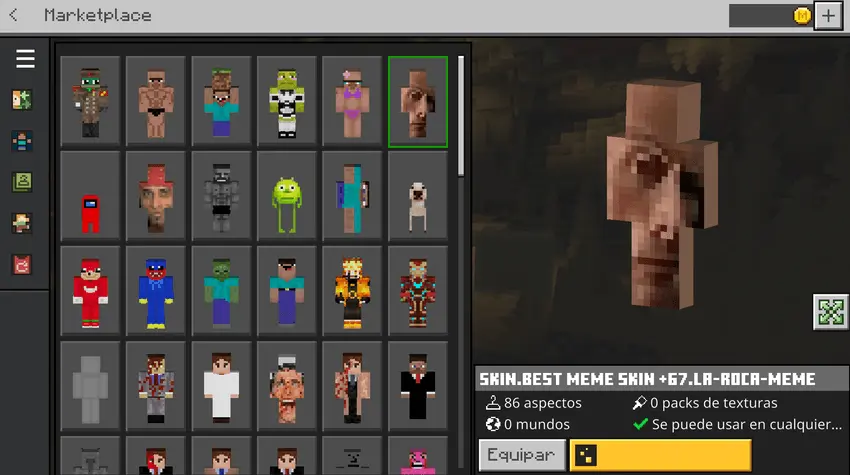
The best part about this massive roster is how perfectly these cursed images translate into blocky pixel art. Usually, joke outfits look horribly stretched out, but these maintain all their ridiculous details. Your random screenshots and Discord clips are going to be top-tier. Instead of wasting hours hunting for individual Minecraft meme skins on sketchy forums, you get a giant locker of peak comedy in a single click. Do yourself a massive favor and grab this MCPE funny skin pack right away. Equip your favorite custom Minecraft skin, queue up for a match, and bring absolute chaos to the lobby.
Quick guide: How to install this Minecraft skinpack
Downloaded the .mcpack file? Here is exactly how to get it into your game depending on what device you are using right now.
- On Windows or Android: Just click or tap the downloaded file twice. Minecraft will open up on its own and load the skins immediately.
- On iPhone or iPad: Save the file, open your Files app, and hold your finger on it. Hit Share, select Minecraft from the list, and the game will handle the rest.
To put the skins on, just open Minecraft, head over to the Dressing Room (Profile), click on Classic Skins on the left, find this pack under Owned, and tap Equip.
Comments (0)