Ender Dragon – Shader
- 28-04-2026, 12:36
- 709
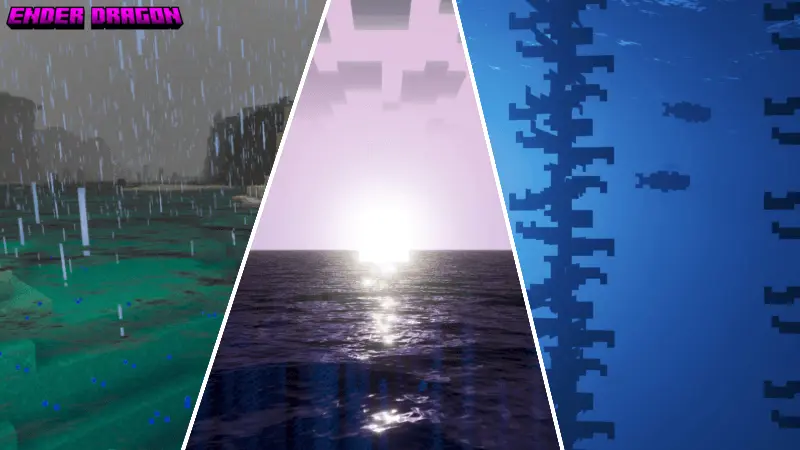
Ender Dragon Shader is built to make your world feel more dramatic throughout the day, with the biggest changes hitting at the times you actually notice lighting the most. The description calls out a magical atmosphere during sunrise and a beautiful magical feeling at sunset, which is the exact kind of lighting vibe that makes even basic survival routines feel less routine. If you’re the type who loads in, steps outside your base, and likes the world to look “alive� instead of flat, this shader is aiming straight at that feeling.
Night is where Ender Dragon Shader leans into a stronger style, described as giving an epic vibe. In real gameplay, that usually means nighttime travel and outdoor base work feel more intense, like the world is pushing you to keep moving instead of instantly sleeping. Even if you’re not doing anything special, an “epic� night look can make simple stuff like walking back from a mine, checking your walls, or fighting a couple mobs near your farm feel more like an event. It’s a mood shift that can make you stay in the session longer because the world feels different enough to keep your attention.


The ocean visuals are another big part of the pack’s identity. Ender Dragon Shader makes the ocean look dynamic, and the water color is described as changing from crystal blue to deep blue depending on the water depth. That depth-based shift is something you’ll notice constantly if your worlds have coastlines, rivers, lakes, or big ocean travel. Shallow water reading as brighter and deeper water turning darker gives the ocean more personality, and it can make boat travel or shoreline exploration feel less boring because the water isn’t just one flat color. If you build near beaches, make docks, or do long boat routes, that depth-driven water color can make your world feel more natural and more visually interesting while you play normally.
Ender Dragon Shader is also described as making gameplay more moody, in the sense that it makes you want to stay and keep playing Minecraft. That’s the core appeal here: it’s not selling complicated features, it’s selling atmosphere that keeps your session feeling fresh. A practical way to enjoy Ender Dragon Shader is to test it during sunrise, sunset, and night back-to-back in the same area, then take a quick trip along the coast to see the water shift from crystal blue to deep blue as depth changes. If you want a Minecraft Bedrock shader that focuses on magical time-of-day vibes and dynamic depth-based ocean color, Ender Dragon Shader is designed to deliver that mood.
Installation:
- Download Shader;
- Open the downloaded .mcpack to install;
- Select texture in settings;
- Done.
Comments (0)