MONSTER – Shader
- 28-02-2026, 19:03
- 570
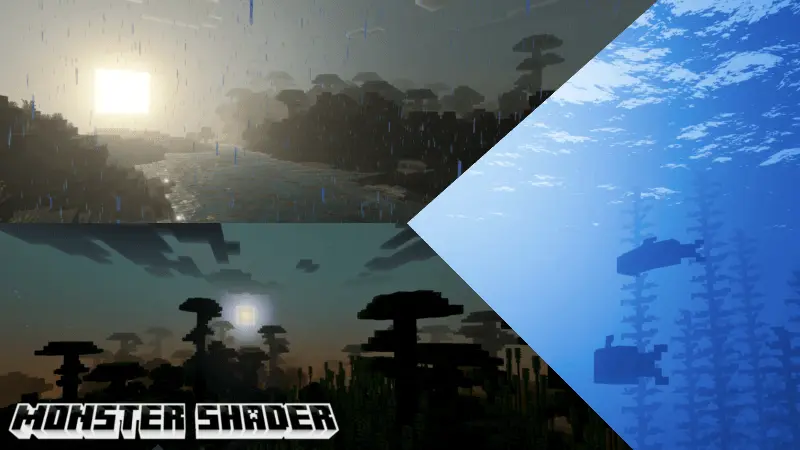
MONSTER SHADER is the kind of visual pack that changes the feeling of a world more than the actual layout of it. The description keeps the idea simple, but the mood is very clear: warm light in the morning, a more magical tone in the evening, and a stronger, more dramatic vibe once night takes over. That kind of day cycle matters a lot in Minecraft Bedrock because you are constantly moving through those lighting changes while building, exploring, farming, or just running back home before dark.
The sunrise side of MONSTER SHADER sounds especially good for slower survival sessions. Warm morning light usually makes the world feel calmer and more alive, which is great when you are starting a new day, checking your base, or heading out for resources. Then sunset shifts the atmosphere into something more magical, which can make even basic stuff like crossing a plains biome or standing near your house feel more memorable. A lot of visual packs only really shine at one time of day, but MONSTER SHADER is clearly trying to give each stage its own personality.


The water look is another big part of the pack’s style. The ocean is described as deep blue while still staying crystal clear, and that is the kind of detail you notice all the time if your world has rivers, coastlines, docks, or long boat travel. It gives water more presence without making it feel muddy or unreadable. If you like building near beaches or spending time around open water, that deep blue tone can make those areas feel more dramatic without losing visibility.
What really sells MONSTER SHADER is the overall mood. It is described as making gameplay feel moodier in a way that makes you want to stay and keep playing, and that is honestly the best use case for a pack like this. It is not trying to overload the screen with random effects. MONSTER SHADER sounds more focused on atmosphere that stays with you during normal play, which makes it a strong choice for players who want Minecraft Bedrock to feel richer, darker, and more alive from sunrise all the way into the night.
Installation:
- Download Shader;
- Open the downloaded .mcpack to install;
- Select texture in settings;
- Done.
Comments (0)