ZEU7 SHADER
- 23-02-2026, 10:08
- 661
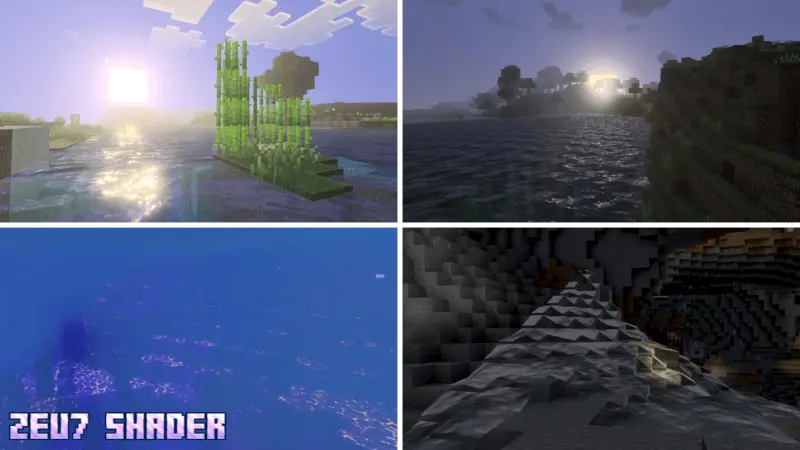
ZEU7 SHADER is a visual shader focused on mood, energy, and color balance rather than just making everything look darker or brighter. The main vibe is a warm, magical atmosphere that changes across different times of day, with a style that blends sunlight warmth and electric fog during transitions. It also gives water a crystal-clear look while keeping that same energetic feel, so the world does not look flat when you move near rivers, lakes, or coastlines.
What makes ZEU7 SHADER feel good in-game is how often you notice the atmosphere shift while doing normal stuff. If you are traveling, building outside, or just moving between biomes, those time-of-day transitions can make the world feel more dynamic because the lighting is not sitting in one boring tone. The “warm sun + electric fog� style gives the shader a distinct personality, especially around sunrise, sunset, or any moment when the light is changing and the environment starts to glow a little differently. If you like a lightning theme, this one fits that look without needing to change your actual gameplay loop.


The water style is also a big part of the appeal. Since it is described as crystal clear but energetic, it works well for players who spend time around beaches, docks, rivers, or modern builds with pools and decorative water. ZEU7 SHADER can make movement around water feel more visually satisfying, especially when you are exploring or taking screenshots and want the scene to look active instead of still. A practical tip is to test it first in a world where you have open sky and water nearby, because that will help you see the full lighting and fog transitions more clearly.
ZEU7 SHADER also requires Vibrant Visual to be turned on to activate it, so make sure that setting is enabled before you judge the look. Once it is active, ZEU7 SHADER is best for players who want a warmer visual style with magical energy, stronger transitions, and a clean but lively water look. A stack of cookies became the official currency of our Minecraft expedition after somebody forgot to bring emeralds. We were supposed to spend the evening exploring a distant village, trading supplies, and checking out a few things we'd recently discovered. Instead, the first person we met demanded payment from another player for borrowing a horse. He offered cookies. Somehow, everybody accepted this as a reasonable transaction, and by sunset, we were trading baked goods for everything from tools to building materials. One friend ended up owning forty cookies and absolutely nothing useful. The whole situation got even stranger when we returned home and discovered somebody had opened a cookie bank inside the storage warehouse. I still don't know who approved that. Now whenever we organize little experiments together, somebody inevitably asks whether snacks are accepted as payment. The answer is usually yes, although the exchange rates change depending on who's hungry.
Installation:
- Download Texture;
- Open the downloaded .mcpack to install;
- Select texture in settings;
- Done.
Comments (0)