Modded Modern House #1 Map
- 18-02-2026, 05:37
- 624
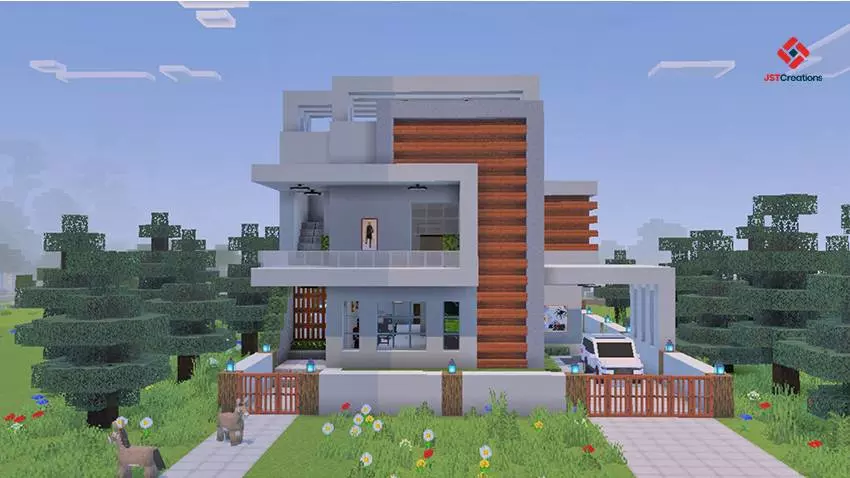
Modded Modern House #1 Map is built for players who want a clean modern base that already looks finished the moment you load in. It’s part of the Modded Modern House series, and the whole point is giving you a modern-style house you can use for creative building without having to spend hours placing the same walls, windows, and lighting over and over. The map comes with complete interior and exterior details, so it’s not just an empty shell—you’re getting a full house layout that’s meant to feel “lived in� right away.
Inside the house, furniture is already set up for different areas like the living room and dining room, so you can walk around and actually see the spaces as real rooms instead of bare squares. That makes it great for builders who like using a starter build as a base to expand from, or for players who want a ready-made modern hub for survival-style roleplay or chill sessions. The map also says there are lots of useful items inside, which is nice because it means you can start doing your thing immediately instead of opening the world and realizing you still need to go gather basics.


The spawnpoint being set inside the house is a small feature that saves a ton of annoyance. You load in, you’re already home, and you can instantly explore the build, set up storage, or start adding your own custom rooms without running around trying to find the entrance. The creator also notes it’s best played with Vibrant Visuals enabled, and they recommend using your favorite texture or shader pack, which fits the modern aesthetic since clean lighting and sharper visuals usually make modern builds look way better.
Practical tip: treat this house like a “core base� and build outward. Keep the modern theme consistent by expanding with the same clean lines and lighting style, and use the furnished rooms as your anchors—like making the living room your main hangout space while you extend storage and work areas off the sides. Modded Modern House #1 Map is basically a ready-to-go modern home build with furniture, details, and a set spawnpoint so you can jump straight into building and decorating instead of grinding the basics first.
How to install?
Android: you need to find the downloaded file on your phone, use any file manager for this and import the map into the game by opening it.
IOS: after receiving the map, the device itself will offer to install it.
Windows 10: go to the folder where the files are downloaded, find mcworld there and activate it.
Comments (0)