Commander Zombie Skin
- 24-02-2026, 10:20
- 476
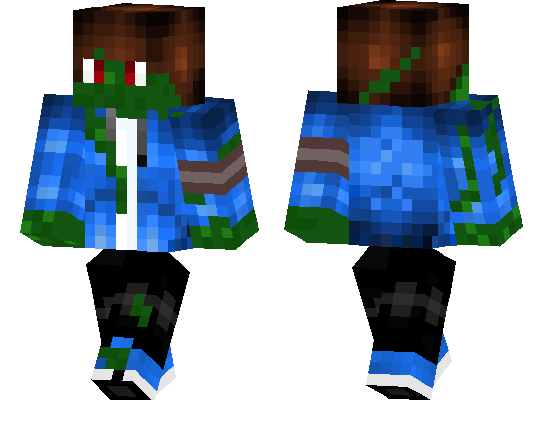
Commander Zombie Skin is a solid pick if you want your character to look like an infected leader instead of a basic zombie reskin. The “commander� part gives it a stronger identity, so it feels like a real character skin with a role, not just a random undead texture. It has that cool mix of zombie horror and military authority, which makes it fit a lot of darker world themes.
In survival, Commander Zombie Skin is great for apocalypse-style runs, ruined-city maps, or any world where you want your character to look like part of the danger. It also works well in PvP and faction servers because the commander vibe makes your skin look more serious and organized, especially if your team is running matching military or undead-themed cosmetics. Even regular gameplay feels more fun when your character looks like the boss of a zombie squad.
Commander Zombie Skin is also easy to build around for roleplay. You can use it as an undead general, infected officer, or final-wave enemy style character. If you want a Minecraft Bedrock skin that feels aggressive, themed, and memorable, Commander Zombie Skin is a strong choice.
How to Install Skins in Minecraft Bedrock
- Download a .png skin (64×64 or 128×128).
- Open Minecraft Bedrock.
- Go to Profile (hanger icon) → Edit Character.
- Tap Owned → Import → Choose New Skin.
- Select your .png file.
- Pick a model: Classic (Steve) or Slim (Alex).
- Confirm to equip and play.
Comments (0)