Adventure Legends - 4 Skin Pack
- 21-07-2026, 05:38
- 349

The Adventure Legends - 4 Skin Pack takes classic RPG fantasy heroes and drops them straight into your survival world. It is the perfect upgrade if you are tired of running around your medieval builds looking like a generic default Steve.
Let's be real, nothing ruins the immersion of a massive custom dungeon crawl or a heavy faction server faster than showing up in a basic t-shirt and jeans outfit. If your friend group is gearing up for a serious quest, you need character models that actually match the vibe. This Minecraft Bedrock fantasy skins pack delivers exactly that, giving you a tight squad of four highly detailed, adventure-ready warriors.
The developer didn’t clutter the pack with dozens of filler designs nobody is actually going to use. Instead, you get four incredibly clean, readable models that look straight out of a classic tabletop RPG. The pixel art is sharp enough that your character won’t look like a blurry mess when you are rushing into a pillager outpost or defending your base during a raid. Plus, it completely skips all the fake, buggy 3D geometry that usually clips right through your enchanted armor.
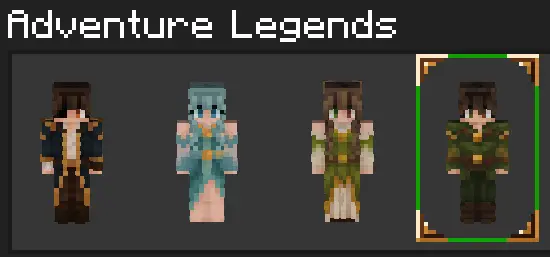
Vanilla survival can sometimes feel incredibly disconnected from its own fantasy roots, especially when everyone in your lobby is running around in pixelated hoodies or modern streetwear. Blockwave Studios engineered this collection specifically to bridge that aesthetic gap, dropping four meticulously crafted character models that actually belong in a high-stakes dungeon crawler. Instead of looking like a disposable background NPC, equipping one of these Minecraft Bedrock fantasy skins makes you look like a seasoned veteran who has genuinely survived the deepest layers of the Nether. The developers didn't just slap a flat coat of paint on the default model and call it a day. The advanced shading techniques used on the leather straps, metallic plating, and fabric folds give these MCPE RPG skins a heavy sense of three-dimensional depth. Whether you are aggressively speed-bridging in a competitive mini-game or actively dodging Warden sonic booms underground, the geometry remains razor-sharp. The textures map tightly to your character, completely avoiding that cursed stretching or tearing around the shoulders when you execute a heavy sprint-jump.
Because it is fully optimized, you literally just click the file once and all four heroes instantly load right into your dressing room without any annoying external apps. If your survival squad wants to upgrade their aesthetic before tackling the next major boss fight, grab this MCPE adventure skin pack and go look like an actual legend on your server.
Quick guide: How to install this Minecraft skinpack
Downloaded the .mcpack file? Here is exactly how to get it into your game depending on what device you are using right now.
- On Windows or Android: Just click or tap the downloaded file twice. Minecraft will open up on its own and load the skins immediately.
- On iPhone or iPad: Save the file, open your Files app, and hold your finger on it. Hit Share, select Minecraft from the list, and the game will handle the rest.
To put the skins on, just open Minecraft, head over to the Dressing Room (Profile), click on Classic Skins on the left, find this pack under Owned, and tap Equip.
Comments (0)