Summer Teens Skin Pack
- 14-08-2026, 11:53
- 320

Get your squad ready for the warmest biomes with the Summer Teens Skin Pack, bringing six fresh, warm-weather outfits perfect for everyday survival. Whether you are building a massive beach house or just exploring with friends, this collection keeps your character looking completely seasonally appropriate.
There is nothing weirder than sweating it out in a desert temple or tropical jungle while your avatar is stuck wearing a heavy winter coat. This drop fixes your wardrobe instantly, hooking you up with an entire roster of characters—Charlotte, Henry, Liam, Mateo, Sophia, and Theodore. Having six distinct but cohesive outfits is amazing if you run a private realm with your regular crew. Everyone can pick a different teen, and suddenly your whole group looks totally coordinated for those long building sessions by the ocean. The designs capture that relaxed, out-of-school energy perfectly, swapping out bulky layers for casual shorts, vibrant tees, and sunny accessories.
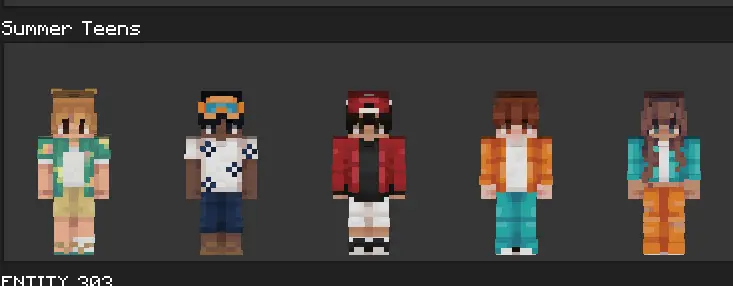
What really makes these models stand out is how naturally they blend into vanilla gameplay. The pixel work leans into a classic, bright style without overcomplicating the textures, meaning they look phenomenal even if you don't run heavy graphics add-ons. If you are hunting for a reliable Minecraft Bedrock skin pack that just feels good to use day in and day out, this six-piece set is a massive winner. Ditch the outdated outfits and upgrade your aesthetic with a high-quality MCPE custom skin today. It is hands-down one of the best Minecraft teen skins collections to grab before you start your next big vacation build.
Quick guide: How to install this Minecraft skinpack
Downloaded the .mcpack file? Here is exactly how to get it into your game depending on what device you are using right now.
- On Windows or Android: Just click or tap the downloaded file twice. Minecraft will open up on its own and load the skins immediately.
- On iPhone or iPad: Save the file, open your Files app, and hold your finger on it. Hit Share, select Minecraft from the list, and the game will handle the rest.
To put the skins on, just open Minecraft, head over to the Dressing Room (Profile), click on Classic Skins on the left, find this pack under Owned, and tap Equip.
Comments (0)