CLEAR FOG VISUAL – Texture Pack
- 27-02-2026, 16:44
- 379
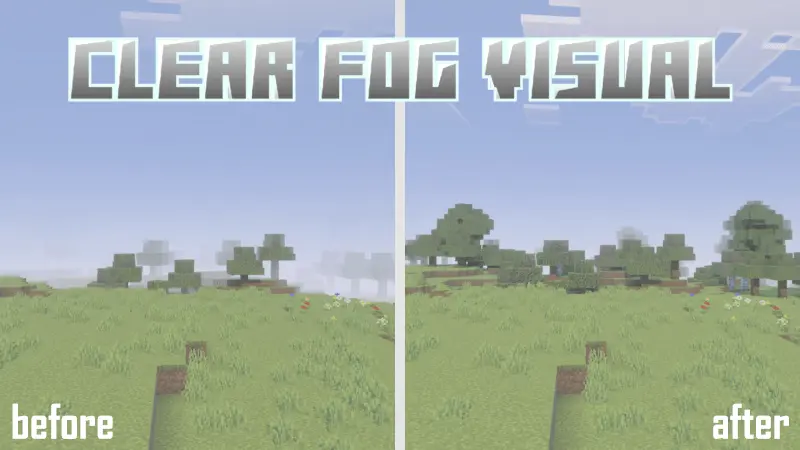
CLEAR FOG VISUAL Texture Pack is built for players who want more control over how far they can see and how “open� the world feels. The pack is described as something you can clearly notice in before-and-after comparisons, which makes sense because fog changes are usually one of the most obvious visual differences you can make. If you’ve ever felt like the world looks too hazy or like distant terrain fades out too early, this pack is aimed straight at that problem.
The key feature in CLEAR FOG VISUAL Texture Pack is that it lets you set the fog level before starting your world, using subpacks to adjust the fog strength. That’s a practical setup because different players want different vibes. Some people want almost no fog so they can see far and scout terrain easily, while others still want a little fog for atmosphere but not enough to make everything feel blocked. Having multiple subpack options means you can pick what feels right for your device, your world style, and the kind of gameplay you’re doing.
In real Minecraft Bedrock sessions, fog control can change how exploration and building feel. When you can see farther, traveling becomes more straightforward because you can spot landmarks earlier and plan routes better. It can also make large builds feel more impressive since you can actually view them from a distance instead of watching them disappear into haze. If you like building towers, castles, city maps, or anything meant to be seen from far away, CLEAR FOG VISUAL Texture Pack can make those projects look more readable during normal play.
A practical way to use CLEAR FOG VISUAL Texture Pack is to test a couple fog-level subpacks in the same area and pick the one that feels best for your typical session. If you do a lot of exploration, go with the clearest option. If you like atmosphere but want better visibility, pick a middle option. CLEAR FOG VISUAL Texture Pack is a simple visual utility pack for Minecraft Bedrock players who want adjustable fog levels and a clearer world view without changing gameplay mechanics.
Installation:
- Download Texture;
- Open the downloaded .mcpack to install;
- Select texture in settings;
- Done.
Comments (0)