Modded Modern House #3 Map
- 22-02-2026, 12:04
- 644
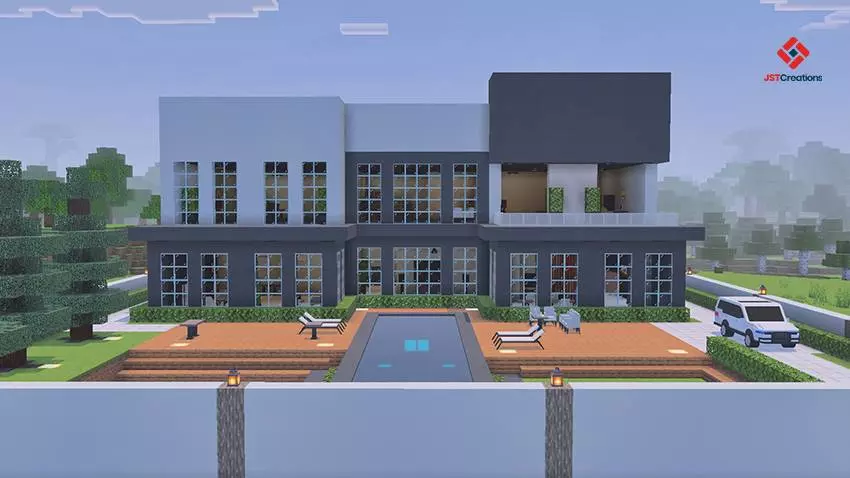
Modded Modern House #3 Map is built for players who want a clean, modern base without spending their first session doing the boring setup work. It’s the third house in the series, and it’s meant to feel like a complete home the moment you load in. The house comes with full interior and exterior detailing, so you’re not walking into an empty shell—you’re getting a finished modern build that’s ready for either creative building sessions or a survival-style “base start� vibe.
Inside, the map includes furniture for different parts of the house, like the living room and dining room, which makes the space feel like an actual home instead of a generic box. That also makes it great for players who like roleplay-lite worlds, screenshots, or just the comfort of having a base that looks organized and intentional. The creator also mentions there are lots of useful items inside, which is perfect if you’re using the house as a starting hub where you can gear up and start exploring without immediately scrambling for supplies.


A big quality-of-life detail is that the spawnpoint is already set inside the house. That means when you load the world or respawn, you’re right back in your safe zone instead of spawning somewhere random and running back. On Minecraft Bedrock, that’s especially nice for casual play because it keeps your sessions smooth and predictable.
Visually, the map recommends playing with Vibrant Visuals enabled and also says it’s best with your favorite texture or shader pack. That’s a strong hint the build is meant to look sharp—modern houses live and die on lighting, clean lines, and materials popping the right way. Practical tip: treat the house like your main hub and build outward from it. Add paths, a yard, a garage-style area, or a city block around it, so the modern home feels like part of a bigger world instead of a standalone showpiece. Modded Modern House #3 Map is basically a ready-made modern base with furniture, detail, and a comfy spawn setup that lets you jump straight into building or survival plans.
How to install?
Android: you need to find the downloaded file on your phone, use any file manager for this and import the map into the game by opening it.
IOS: after receiving the map, the device itself will offer to install it.
Windows 10: go to the folder where the files are downloaded, find mcworld there and activate it.
Comments (0)