Neon Rider – Skin Pack
- 1-06-2026, 01:16
- 314
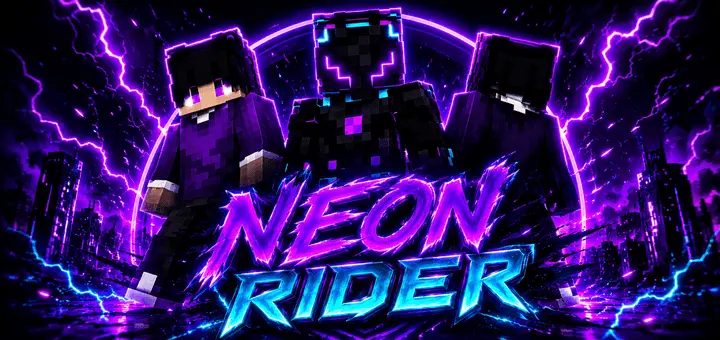
Neon Rider - skin pack will give you 3 dark purple skins with a futuristic look. The skins are suitable for role-playing games, PVP, and just survival. Blowing past an opposing squad on a neon-lit bridge while decked out in glowing cybernetic biker gear sends a brutal message before the first arrow even flies. The Neon Rider skin pack brings three sleek, synthwave-drenched purple fits straight to Minecraft Bedrock for anyone sick of blend-in-the-mud outfits.
Most custom skins trying to pull off a futuristic look crash hard into sensory overload. You usually see creators slap twenty random contrasting neon dyes across a Steve model until the whole thing looks like a broken graphics card artifacting in real time. This trio takes the opposite route by committing to deep midnight charcoal bases, slicing across the fabric with focused ultraviolet circuitry and violet biker trims. The contrast pops with heavy intention. When you are sprinting across end stone or navigating dim obsidian tunnels, the luminous violet piping defines your character outline without turning you into an obnoxious beacon that ruins your spacing. It nails that underground cyber-street racer aesthetic where every seam looks engineered for speed rather than thrown together in a basic pixel editor.


What really counts during sweat-tier PvP skirmishes is how a skin behaves when your camera is whipping around at high DPI. Bulky, amateur cosmetics tend to feature massive shoulder geometry or noisy wrist textures that eat up half your screen whenever you pull back a crossbow or raise an iron shield. These three models keep their exterior layers streamlined. The helmets, riding collars, and reinforced gauntlets sit on the secondary skin layer with enough offset to create genuine physical depth, yet they taper cleanly around the forearms. That design choice means your first-person viewmodel remains tidy, leaving your crosshairs completely clear for landing critical strike combos and tracking enemies trying to strafe through your peripheral vision.
Beyond the ranked arena grind, these designs hit just as hard when cruising around an established survival world. Mounting a skeletal horse on an ice highway or blasting through a nether portal hub wearing full techno-rider gear turns ordinary transit into pure cinematic spectacle. The three distinct variants let a trio of players coordinate their look without running clone avatars, giving each person their own custom helmet visor and armor paneling layout. If you run roleplay servers set in dystopian megacities, neon-soaked custom adventure maps, or just want your crew to look like an organized syndicate during realm expeditions, these threads deliver unmatched personality without feeling out of place alongside vanilla blocks.
Getting the trio imported into your client requires zero headache since the mcpack archive hooks straight into your native Bedrock locker across mobile, Xbox, PlayStation, and PC. Every skin respects standard player boundaries, so your hitboxes stay entirely legitimate with zero risk of weird collision glitches or auto-moderation kicks on featured community servers. It is a tight, focused cosmetic drop that cuts through the noise of overcrowded community skin catalogs. If you want your survivor to roll with dark cyber-speedster energy during your next marathon session, slipping into these violet racing leathers is an immediate upgrade.
How to Install Skins in Minecraft Bedrock
- Download a .png skin (64×64 or 128×128).
- Open Minecraft Bedrock.
- Go to Profile (hanger icon) → Edit Character.
- Tap Owned → Import → Choose New Skin.
- Select your .png file.
- Pick a model: Classic (Steve) or Slim (Alex).
- Confirm to equip and play.
Comments (0)