UI Enhanced – Texture Pack
- 28-02-2026, 05:14
- 608
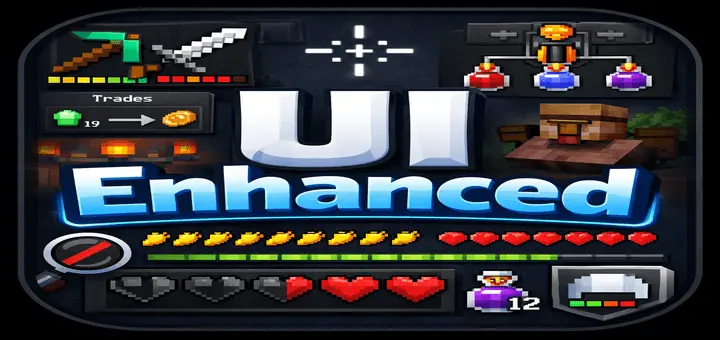
UI Enhanced – Texture Pack is the kind of pack you notice right away because it changes the part of the game you look at every second you play. Instead of leaving the old default interface untouched, it pushes the whole UI toward a darker, cleaner, more polished style that feels easier on the eyes during long sessions. The description clearly frames it as a lightweight pack, which matters a lot for Bedrock and Pocket players who want the screen to feel better without loading in a giant, messy overhaul.
What makes UI Enhanced – Texture Pack feel useful is that it mixes style changes with real quality-of-life stuff. The dark UI and smooth font already make menus look cleaner, but the pack also adds a better crosshair, white outline, durability viewer, and better HUD tooltips. Those are the little things that can make normal survival play feel more comfortable, especially when you are moving fast, swapping tools, checking gear, and opening menus over and over during mining, building, or farming. A full trade view is also a nice touch because it makes villager interaction feel more direct instead of making you guess what is waiting later.


UI Enhanced – Texture Pack also removes a lot of visual junk that usually gets in the way. No pumpkin overlay, no underground vignette, and no spyglass overlay can make the screen feel much more open during normal play. Clear Wither effect hearts and a golden carrot hunger bar are the kind of edits that make the HUD easier to read without changing the actual gameplay. The same goes for the Brewing Stand Guide, which adds convenience in one of those menus players often revisit but do not always want to stop and think about.
Another good part of UI Enhanced – Texture Pack is that it keeps trimming extra friction. No How to Play button helps clean up the interface, which fits the whole point of the pack really well. This is not just about making Minecraft Bedrock look different for a screenshot. It is about making the UI feel smoother every time you log in, open menus, trade, brew, fight, or explore. If you want a lighter, sharper interface that removes distractions and adds practical screen upgrades, UI Enhanced – Texture Pack sounds like a strong everyday choice.
Installation:
- Download Texture;
- Open the downloaded .mcpack to install;
- Select texture in settings;
- Done.
Comments (0)