Zombot Skin
- 23-01-2026, 19:05
- 507

Zombot Skin is what you wear when you want to look like a zombie that got upgraded in a lab instead of cured. The robot zombie concept is instantly cool because it’s half horror, half sci-fi, so it fits both creepy worlds and futuristic city maps without feeling out of place. You get that “unstoppable� energy, like you don’t breathe, don’t sleep, and definitely don’t care about fall damage.
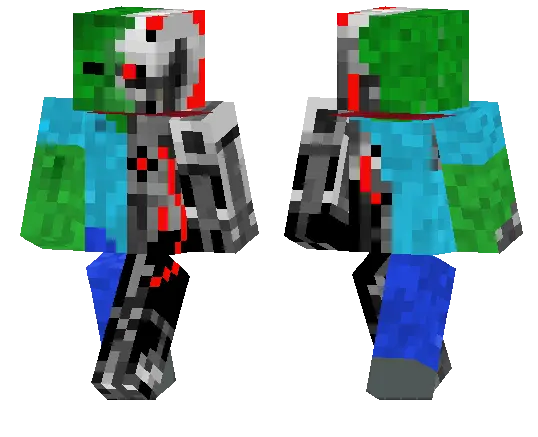
On multiplayer servers, Zombot Skin stands out because it’s easy to read and it looks different from the usual “just a zombie� skins. It’s perfect for PvP because you already look like a boss mob before the fight even starts, and it’s great for minigames where you want a memorable look people can spot fast.
In survival, Zombot Skin pairs really well with industrial builds, underground bunkers, and redstone-heavy bases. Running caves and fighting mobs feels extra fitting when your character already looks like a machine made for combat. If you want a skin that’s creepy, mechanical, and instantly recognizable, Zombot Skin is a clean main.
How to Install Skins in Minecraft Bedrock
- Download a .png skin (64×64 or 128×128).
- Open Minecraft Bedrock.
- Go to Profile (hanger icon) → Edit Character.
- Tap Owned → Import → Choose New Skin.
- Select your .png file.
- Pick a model: Classic (Steve) or Slim (Alex).
- Confirm to equip and play.
Comments (0)