NoierUi - Estatic – Texture Pack
- 6-03-2026, 10:30
- 817
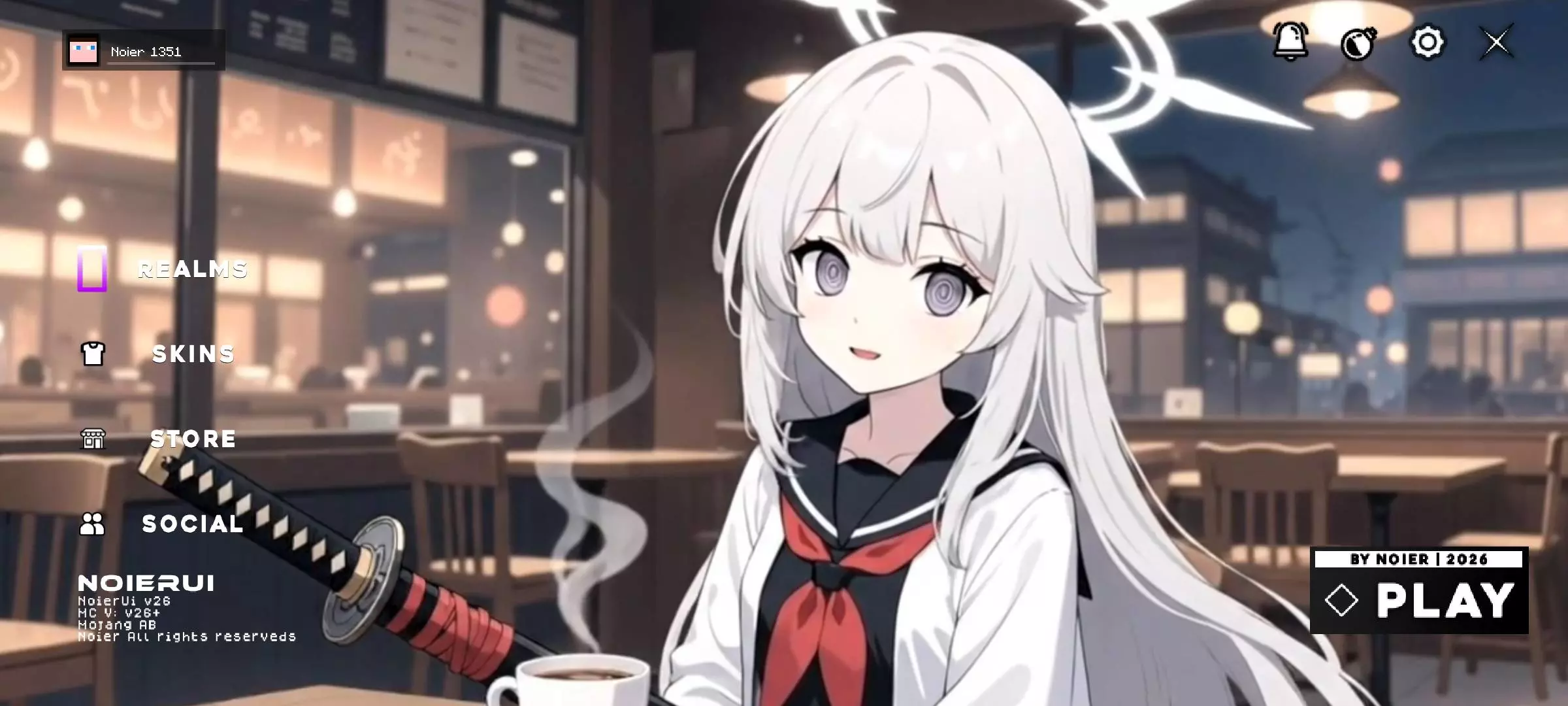
NoierUi - Estatic Texture Pack feels like one of those small changes you notice right away once you open the game. The whole idea is pretty simple: give Minecraft Bedrock a darker, cleaner interface that looks better on mobile and does not mess with stability. A lot of UI packs try too hard and end up feeling busy, but this one goes the other way. It stays minimal, keeps the screen neat, and makes the menus feel more comfortable to look at.
That mobile focus is really the main thing here. NoierUi was made for phones, so it puts usability first instead of throwing in a bunch of heavy visual stuff that can make the interface feel awkward or bloated. If you spend a lot of time in menus, settings, inventory screens, or just play for long sessions on a smaller screen, the darker style can feel way easier on the eyes. It looks cleaner, but it still keeps that practical everyday feel.
You see the Minecraft menu every time you open the game, even if you only spend a few seconds there before joining your world. NoierUi - Estatic gives that familiar starting screen a different look, with a darker style and a cleaner presentation. It also changes the loading screens, so the new design stays with you while you wait for a world to open. If the usual menu has started to feel a little too familiar, this pack offers a simple way to change the first thing you see when you play.
The darker interface is probably the most noticeable difference. Bright menu screens are replaced with a more subdued appearance, giving the game a quieter look before you even enter a world. That can be particularly appealing if you like using dark themes on your phone or tend to play in the evening. It’s still a matter of personal preference, of course: some people like bright menus, while others would rather look at darker backgrounds. The easiest way to decide is to turn the pack on and spend a little time navigating the screens yourself.
NoierUi - Estatic was made with mobile players in mind. On a phone, the start screen is something you need to read and navigate on a relatively small display, so its layout matters as much as its appearance. Open the game, look over the buttons, and see how the new arrangement feels in your hands. The pack also aims to keep things lightweight, which may appeal to players who want a new interface without adding a large collection of visual effects. As with any resource pack, how it performs can depend on your device and the other content you use.
If you play on a tablet or computer, there are a couple of things worth checking. Some visual elements may appear incorrectly on tablets, while the interface can look very small on a PC. That doesn’t mean you can’t try it on those devices, but it’s a good idea to look through the start and loading screens before settling in for a longer session. Make sure the text is comfortable to read and that you can find the controls you use regularly. On a phone, you can make the same quick check after applying the pack to see whether the new design suits your screen.
This pack is a good fit for anyone who likes adjusting the little details around the game. You don’t have to start another survival world or spend an afternoon changing your builds to enjoy it: the difference is there as soon as you return to the menu. Try it for a few sessions and see how you feel about opening Minecraft to a darker screen. Sometimes a small change to a place you visit every day is enough to make it feel new again.
NoierUi - Estatic Texture Pack is a good pick if you want your Minecraft Bedrock UI to feel sharper without turning it into something overdesigned. It stays lightweight, simple, and stable, which honestly makes a bigger difference on mobile than flashy effects ever do. For players who just want a clean dark interface that feels smooth and usable every time they load in, this pack makes sense fast.
Installation:
- Download Texture;
- Open the downloaded .mcpack to install;
- Select texture in settings;
- Done.
Comments (0)